Frontend Development Without a Backend: The Complete Guide

Every frontend developer knows the feeling. The design is approved, the ticket is yours, and the API you need is "almost ready". Maybe the endpoint exists but returns an empty list. Maybe it exists only as a line in a spec document. Either way, you can't see your screen with real data, and you can't test what happens when that data is missing, slow or broken. This guide covers every practical way to build and test a frontend without a working backend: what each approach costs, where it shines, and how to pick one without turning your mocks into a second codebase.
The problem: frontend work blocked by the backend
On most teams the frontend and the backend move at different speeds. A new feature usually needs both, and the frontend tends to be the one waiting. That wait shows up in a few familiar ways:
- The endpoint doesn't exist yet. You have a contract (an OpenAPI file, a Slack message, a whiteboard photo) but nothing answers the url.
- The endpoint exists, but the data is wrong for what you're building. Your staging account has three items and you need to see three hundred, or the field you render is always
null. - The states you need are hard to reach. An expired subscription, a 500 from the payments service, a response that takes eight seconds. They happen in production, rarely on purpose in development.
- The environment is unstable. Staging is down, a shared database was reset, or a dependency team is mid deploy.
None of these are about writing frontend code. They're about not having the right responses at the right time. And that's the key insight behind every approach in this guide: your frontend doesn't need a backend, it needs responses. If you control what comes back from the network, you can build, test and demo the whole UI before a single endpoint is live.
If you're new to the idea of mocking, why developers mock HTTP requests is a short primer on what a mock is and the trade offs it brings.
The approaches, from simplest to most complete
There are four common ways to give a frontend responses it can't get from a backend yet. They aren't mutually exclusive, and many teams use more than one.
1. Hardcoded data in the component
The quickest thing that works: skip the request and put the data straight into the code.
// TODO: replace with the real API call
const orders = [
  { id: 1, status: 'shipped', total: 42.5 },
  { id: 2, status: 'pending', total: 18.0 },
]
Good for: the first hour of a prototype, when you only care about layout.
The catch: your data fetching code never runs. Loading states, error handling, retries and caching are all untested, and the swap to the real API becomes a refactor instead of a config change. Hardcoded data also tends to outlive its TODO.
2. A local mock server
Run a small server on your machine that answers the endpoints you need: a JSON file served by a tool like json-server, an Express app with a few routes, or a mock server generated from an OpenAPI spec. Your app points its API base url at localhost during development.
Good for: teams that want one shared fake backend, and APIs with a published contract you can generate from.
The catch: it's another process to run and another project to maintain. Pointing the app at it means environment config, and possibly CORS headers on the mock server. And it only helps where your app talks to it: it does nothing for a deployed staging or production build.
3. In-app mocking libraries: MSW and Mirage JS
These libraries intercept requests inside your application, so your fetching code runs for real and the response comes from a handler you wrote.
Mock Service Worker (MSW) registers a Service Worker in the browser that intercepts requests at the network level and answers them from request handlers you write in JavaScript. The same handlers can run in Node.js for tests. It's framework agnostic, widely adopted, and a strong choice when you want mocks that live in the repository and are shared with your test suite.
Mirage JS runs an in-memory API server inside your app. It goes further than per-request responses: you can define models, factories and relationships, so a POST creates a record that a later GET returns. That makes it well suited to prototyping flows that depend on state.
Good for: teams that want mocks version controlled next to the code, shared between development, Storybook and automated tests.
The catch: they're code. You install a dependency, wire it into your app's startup, keep it out of production builds, and update the handlers whenever the API changes. That investment pays off for a long lived project with a test suite. It's a lot to set up just to see one screen with an error state. And because they're part of your build, they only exist where you shipped them, usually local development and tests.
We compared one of these head to head in tweak vs Mock Service Worker, if you're choosing between them.
4. A browser extension
A browser extension can intercept the requests a page makes and answer them with the response you define, with no change to the app at all. tweak is one of these: you create a rule with a url, a method and the response you want, and every matching request gets that response.
Good for: getting unblocked in minutes, testing states that are hard to reach, and working on any environment, including staging and production builds you can't modify.
The catch: rules live in your browser, not your repository (you share them by exporting a file), and they don't run in your Node.js test suite. tweak intercepts the requests your page's JavaScript makes with fetch and XMLHttpRequest, which is where API calls come from.
Comparison: which approach fits
| Hardcoded data | Local mock server | MSW | Mirage JS | tweak (browser extension) | |
|---|---|---|---|---|---|
| Setup | None | A server to run | Install and wire in | Install and wire in | Install the extension |
| Code changes in your app | Yes | Base url config | Yes | Yes | None |
| Your fetching code runs | No | Yes | Yes | Yes | Yes |
| Works on deployed builds | No | No | Only where you ship it | Only where you ship it | Yes, any site |
| Runs in Node.js tests | n/a | Yes | Yes | In jsdom based tests | No |
| Stateful fake data (create, list) | No | Depends on the tool | You write it | Yes, models and factories | No, one response per rule |
| Shared with the team | In the code | In its repository | In your repository | In your repository | Export and import a file |
| Who can use it | Developers | Developers | Developers | Developers | Developers, QA, designers, PMs |
The pattern is clear: the in-app libraries win when mocks are part of the product's engineering (tests, CI, a shared source of truth). A browser extension wins on speed and reach: no setup, no code, and it works on whatever url your browser opens. For day to day frontend work blocked by a backend, speed is usually what matters most.
How to develop without a backend using tweak
Here's the full workflow, from install to a screen running on responses you control. Mock rules are free, up to 12 of them, and need no account.
Step 1: install and start tweak
Install tweak for Chrome, Edge or Firefox. Open your app, open tweak from the browser toolbar, and press play to run it on the current tab.
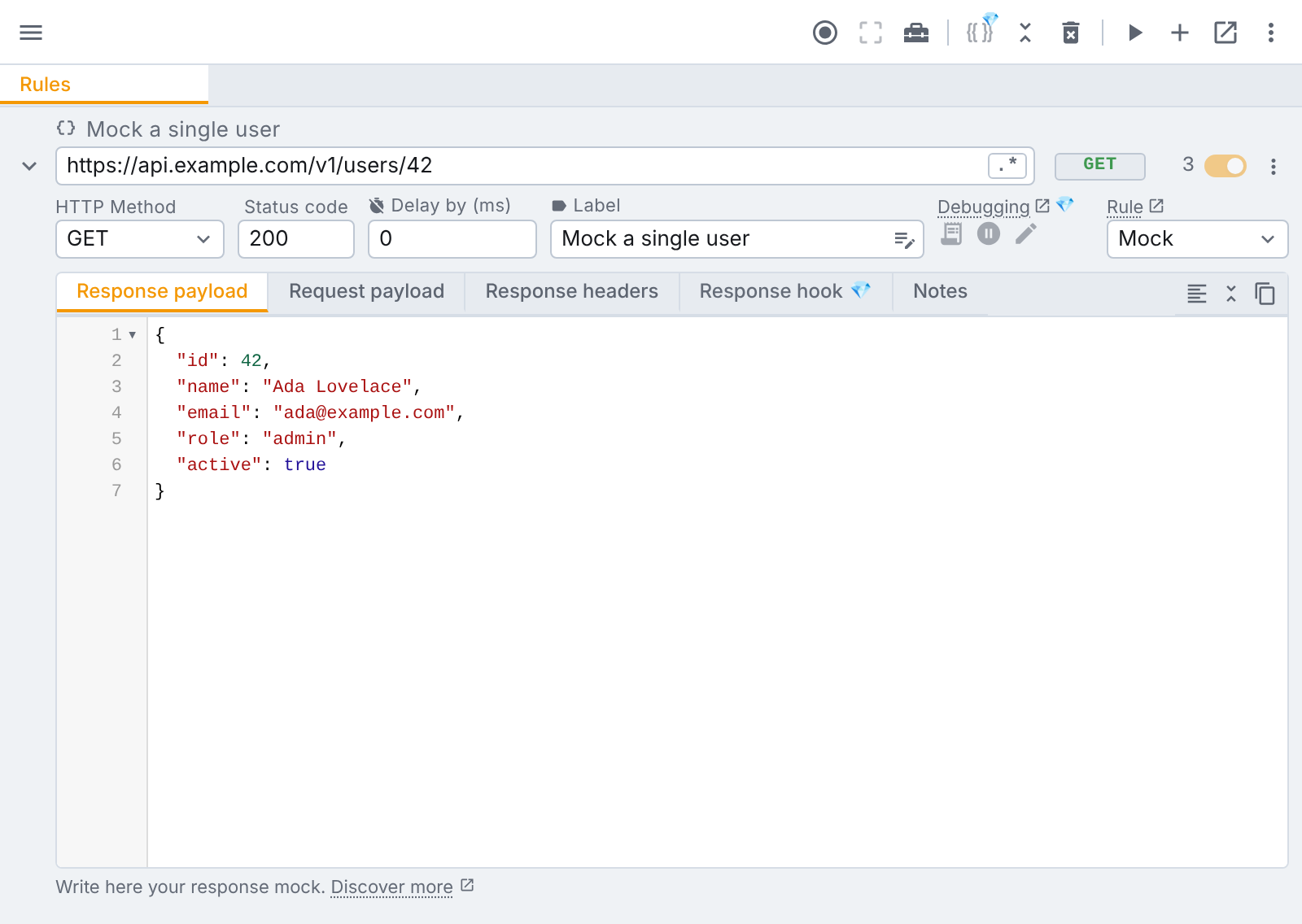
Step 2: create a mock rule for the endpoint
Add a rule and fill in:
- URL: the endpoint your frontend calls, for example
/api/orders. By default tweak matches part of the url, so/api/ordersmatcheshttps://staging.example.com/api/orders?page=1. Turn on the regular expression toggle when you need something more precise. - HTTP method:
GET,POSTand so on. - Status code:
200to start with. - Response payload: the JSON your frontend expects, straight from the API contract.
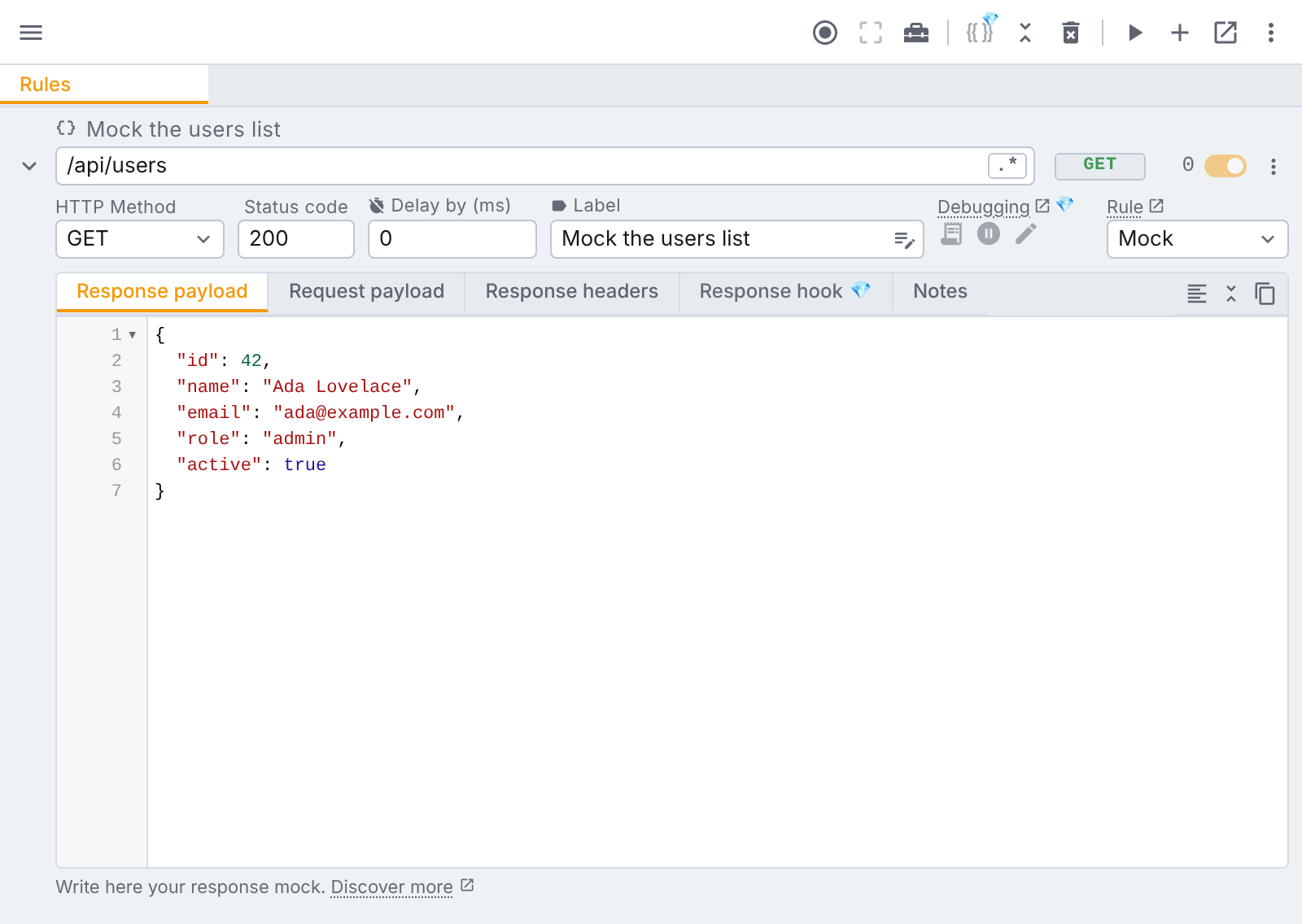
A Mock rule never sends the request to a server. That's the point: the endpoint doesn't have to exist. If your app calls https://api.example.com/v2/orders and nothing lives there yet, the mock still answers it, and your fetching code, loading state and rendering all run as they will in production. The rule docs cover every field.
Step 3: reload and build
Reload your app. The matching request now gets your response, and tweak's counter on the rule tells you each time it was used. From here, building the feature is ordinary frontend work: edit the payload in tweak, reload, and watch the UI follow.
If you want a deeper walkthrough of this step, see how to mock API calls in the browser.
Step 4: start from a real response when there is one
When the endpoint already exists but its data isn't what you need, don't type the payload by hand. Turn on request capture, use the page so the request happens, then search for it from a new rule's url field. Picking it prefills the whole rule: url, method, status, response payload and response headers. Now change the one field you care about.
On Tweak Basic, a Modify rule goes one step further: it lets the real request reach the server and patches the response it gets back, so the rest of the data stays live.
Step 5: share the setup
Once your rules describe the feature, export them from the more options menu and send the .json file to whoever needs it: another developer, QA, a designer reviewing the build. They import it and see exactly what you see. tweak can also import a HAR file and turn the requests in it into rules, which is handy when someone records a session on staging for you.
Real scenarios
Building a new feature against a contract
The API team has agreed the shape of GET /api/invoices but won't ship it for two weeks. Create one mock rule with a realistic payload from the contract and build the whole feature against it. Add a second rule for the empty state (an empty array) and switch between them with each rule's toggle. When the real endpoint lands, turn the rules off. Your code didn't change, because it was calling the real url all along.
Reproducing a bug from production
A customer reports a crash on their dashboard, and you suspect a field that's null for their account only. You can't log in as them, but you can reproduce what their browser received: mock the endpoint with the payload from the bug report on your local build, or on production itself, and watch the crash happen in front of you. Fix, reload, confirm.
Testing error and edge states
Most UI bugs live in the paths nobody clicks in development. A mock rule makes each one a toggle (for the full checklist, see how to test error states in your frontend):
- Server errors: set the status to
500,503or404and check your error screens and retry logic. How to simulate an HTTP error goes through it step by step. - Slow responses: set the rule's delay to a few seconds and see your loading states the way users on a bad connection do. More in how to simulate a slow request.
- Unexpected data: very long strings, missing optional fields, a list of five hundred items.
- Failed requests: a block rule makes the browser cancel matching requests, so the page sees a network error. Free on every plan.
Preparing a demo
A demo on a live environment is a demo at the mercy of that environment. Mock the endpoints the demo touches with clean, convincing data, and the demo works even if staging is having a bad day. Export the rules and anyone on the team can run the same demo.
Pointing the app at a local backend
Sometimes part of the backend is ready on your machine and the rest isn't. A redirect rule sends matching requests to another url, such as http://localhost:8080, while mocks answer the endpoints that don't exist yet. Redirect rules are free.
Changing headers the backend doesn't send yet
Need an auth header the gateway will add later, or a response header your frontend reads? Headers only rules set, append or remove request and response headers, are applied by the browser itself, and are free on every plan.
Going further on paid plans
Everything above works on the free plan. When mocking becomes a bigger part of your workflow, the paid plans add:
- Tweak Basic: unlimited mock and modify rules, Modify rules that patch real responses, collections to group rules per feature, and partial request payload matching, which mocks GraphQL per operation.
- Tweak Max: variables and environments so one set of rules works across local, staging and production, data generators for fresh realistic values on every response, JavaScript response hooks and request hooks when a response must be computed from the request, and Pause & Edit, which holds a live request so you can edit it before it carries on.
What this means for your test strategy
Mocking during development and automated testing are two sides of the same idea: control the responses, and the frontend's behaviour becomes predictable.
The scenarios you mock while building (empty lists, errors, slow responses) are exactly the ones your test suite should cover. A practical way to connect the two:
- Explore in the browser. Use mock rules to find the states that break the UI and fix them as you build.
- Write down what you found. Each state you mocked is a test case. Put them in your end to end or integration suite, using your test framework's own network mocking (Playwright, Cypress and others can stub requests) or MSW handlers.
- Keep manual checks cheap. QA and reviewers can import your rules file and check the same states on a deployed build without a local setup.
For the bigger picture, web application testing covers the types of tests a frontend needs, and our comparison of end to end JavaScript testing frameworks helps you pick a tool for the automated half.
When to stop mocking
Mocks are a bridge, not a destination. They describe what you think the backend will do, and the backend is free to disagree. Plan the hand off:
- When the real endpoint ships, switch your rules off and run the feature against it. Differences in field names, types or error formats show up immediately.
- Don't let a mock hide a contract change. If you keep a rule around for an edge case, update its payload when the API changes, or delete it.
- Test the integration for real before release: at least one pass through each feature with no rules active, against a real environment.
- Keep the rules that earn their place. Error states, slow responses and rare data are worth keeping as rules (or test cases) long after the backend is done, because the real API will rarely give them to you on demand.
The goal isn't to avoid the backend. It's to stop waiting for it.
Conclusion
Frontend work doesn't have to stall while the backend catches up. Hardcoded data gets you a layout, a local mock server gets you a shared fake backend, and libraries like MSW and Mirage JS give you mocks in code that your tests can reuse. A browser extension gets you there fastest: no setup and no code changes, and it works on any environment your browser can open, from localhost to production.
Most teams end up combining them: in-app mocks for automated tests, and a browser extension for building, debugging and demoing in the browser. Mock Service Worker vs a browser extension compares the two in depth.
Install tweak free and mock your first endpoint in a couple of minutes. No account required, 12 mock rules on the free plan.
If you liked this article, consider sharing (tweeting) it to your followers.
Need something else? Request a feature