How to Redirect a Request to Localhost in Chrome

The bug only happens on production. The fix is in your editor. Deploying a branch to find out whether it works takes twenty minutes, and you will need three tries. What you want is the production page, with its real data and its real login, talking to the code running on your machine.
That is a redirect: when the page asks for https://api.example.com/... or https://cdn.example.com/app.js, the browser goes to http://localhost instead. This guide shows how to do it in Chrome with a free redirect rule, and the four or five things that will get in your way the first time.
When you want production to talk to localhost
- Your local backend against the real frontend. You changed an endpoint and want to see the deployed app use it, without running the whole frontend locally.
- Your local build against the real backend. Swap the production bundle for the one your dev server builds, and debug your own code with real data, real permissions and real feature flags.
- One endpoint, not all of them. Point a single slow or broken call at a local fixture while the rest stays on production.
- A different version of the API. Send
/v1/calls to a/v2/you are building on your machine.
In every case the page stays where it is: same address bar, same session. Only the requests you pick go somewhere else.
Step by step: a Redirect rule
Install tweak (no account needed), open it on the tab you want to work on, and add a rule.
- Pick the rule type. Open the rule's type list and pick Redirect.
- Type the url expression. By default it matches part of the url, so
api.example.comis enough to catch every call to that host. Turn on the regular expression toggle if you need more control. - Type where it should go in Redirect to:
http://localhost:3000. - Pick what to catch. For API calls, set Catch to Fetch / XHR. The default, Anything, also redirects the page navigation itself.
- Leave the scope on Active tab. The rule applies only while tweak is running, on that tab.
- Start tweak with the play button and reload the page.
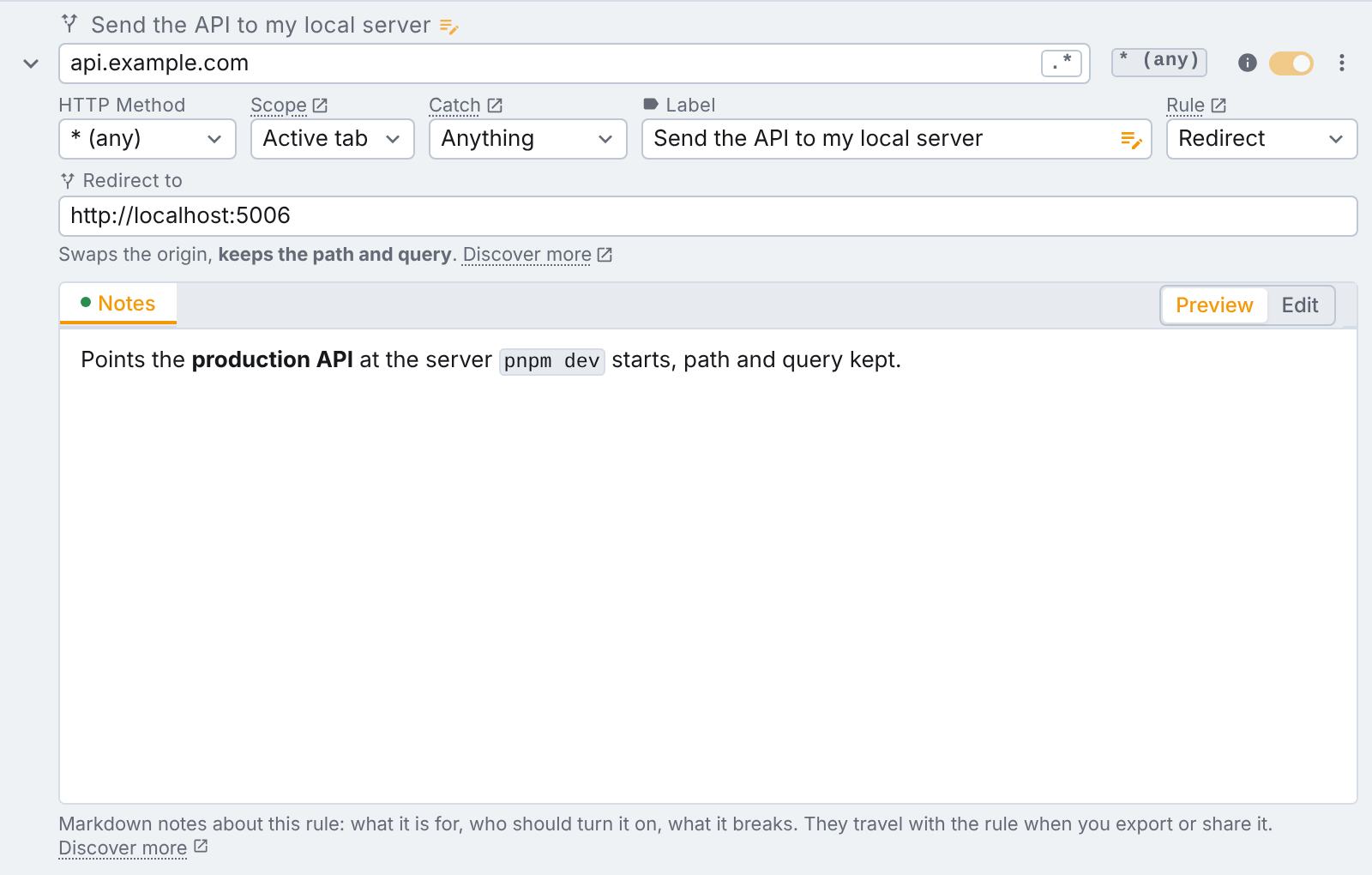
The line under Redirect to names how tweak reads what you typed, so you never have to guess:
| What you type | What happens |
|---|---|
http://localhost:3000 | Swaps the origin and keeps the path and query. |
https://example.com/fixtures/users.json | Sends every match to that exact url, path and all. |
/v2/users, ?debug=1, #top | Rewrites just that part of the url and keeps the origin. |
| A substitution, with the regex toggle on | \1, \2… are the capture groups of the url expression. |
The first row is the one most people want: https://api.example.com/users?page=2 becomes http://localhost:3000/users?page=2.
To check it worked, open the Network panel in DevTools. Chrome shows the original request with an internal redirect status (307) followed by the request to localhost. Our Network tab guide covers how to read it.
Redirect a script or a stylesheet
The redirect is applied by the browser itself, not by code running inside the page. That is why it can reach requests your JavaScript never makes: <script> tags, stylesheets, images, fonts and the page navigation.
To load your local bundle on the production site, use an expression such as cdn.example.com/app.js, set Catch to Script, and redirect to the exact file your dev server serves, for example http://localhost:5173/app.js. A full url with a path is sent as is.
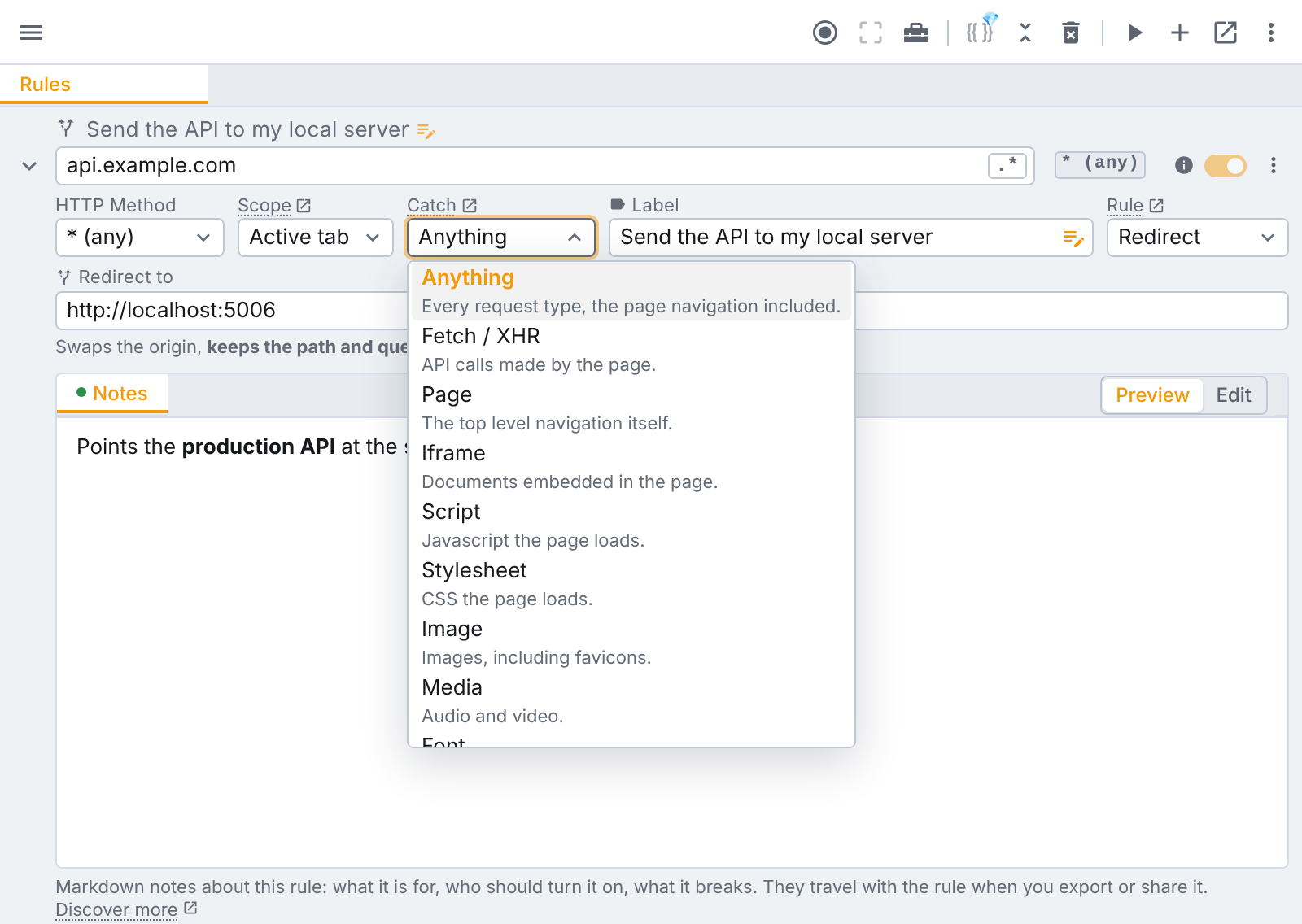
Redirect to a file of the same kind as the one it replaces. If production loads one built bundle, serve a build of your branch (most bundlers have a watch mode that rebuilds into a folder), not the dev server's module entry point.
Move part of the url with capture groups
With the regular expression toggle on, the target can reuse the groups of your expression. https://api\.example\.com/v1/(.*) redirected to http://localhost:3000/v2/\1 moves every /v1/ call onto your local /v2/, whatever follows it.
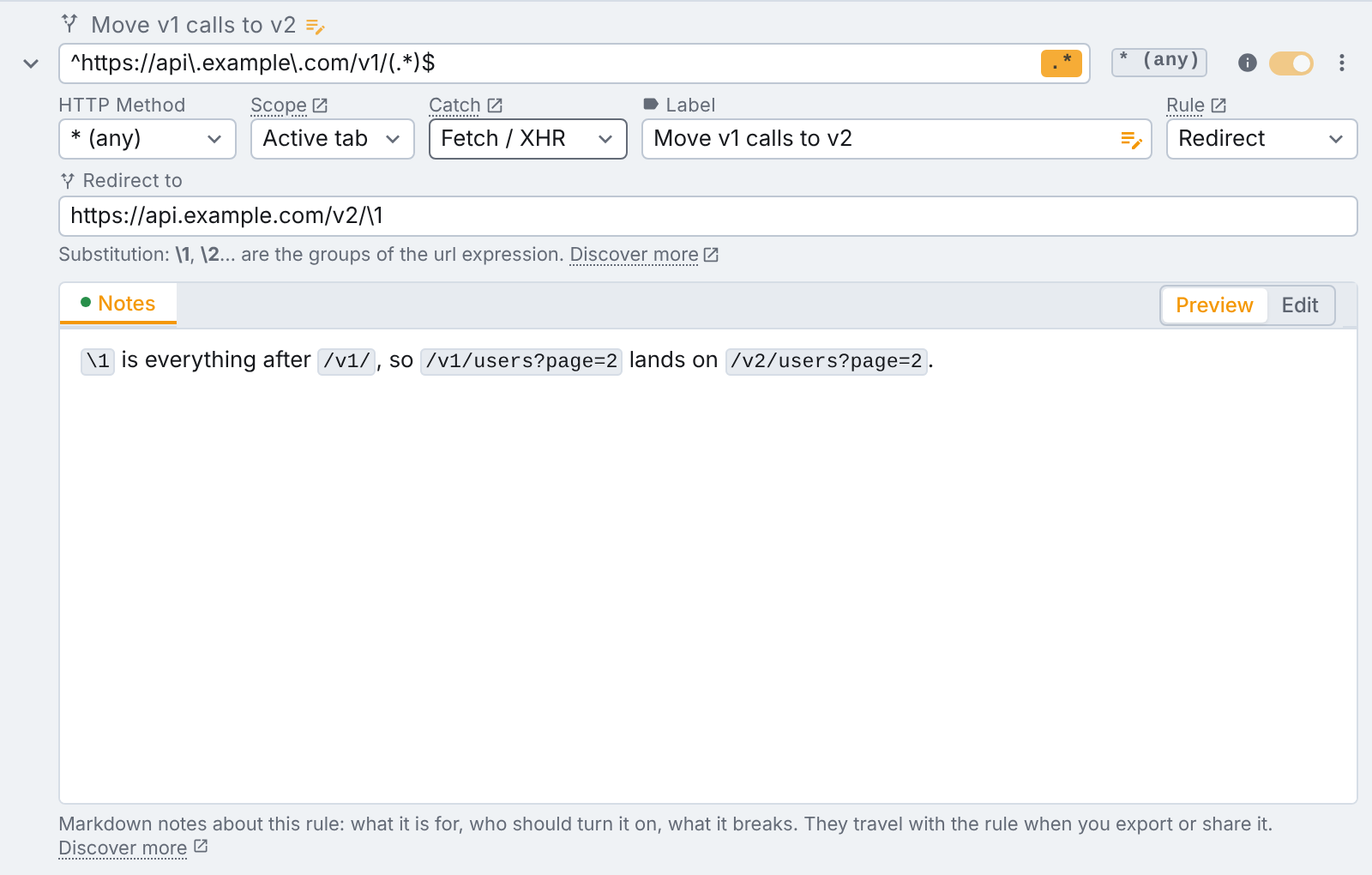
With a regex, the target has to be a whole http or https url: a relative one is rejected and the field turns red.
On Tweak Max, both url fields accept variables: one {{api_host}} variable can re-point every redirect rule at once, from staging to localhost and back.
The traps, and how to get past them
CORS
The page still runs on https://app.example.com. Your local server is now a different origin, so the browser checks its responses against the page's origin, and a server that never had to think about CORS fails that check. The fix is on the local server: send Access-Control-Allow-Origin with the page's origin, and answer the OPTIONS preflight. If it sends cookies, it must name the exact origin (not *) and add Access-Control-Allow-Credentials: true.
If you cannot change the local server, a free headers only rule can add the headers in the browser. How to fix CORS errors in the browser walks through it with the CORS unblock template. When a redirect rule and a headers only rule match the same request, tweak applies both.
The same goes for some assets: a module script, a script with a crossorigin attribute, and web fonts are all fetched with CORS, so they need those headers too. A plain <script src> does not.
Mixed content and local network access
An https page normally may not load anything over plain http. localhost is the exception: Chrome and Firefox treat http://localhost and http://127.0.0.1 as trustworthy, so they are not blocked. A custom local hostname (http://myapp.test) or a LAN address (http://192.168.1.20) is mixed content and gets blocked. Use localhost, or serve your local server over https.
Recent Chrome versions also ask before a public website can reach your local network or localhost. If a permission prompt appears after you set up the redirect, allow it for that site. If you blocked it once, change it in the site's settings.
Cookies and sign-in
Cookies belong to a host. A request redirected to localhost carries the cookies of localhost, not the session cookie of api.example.com, so your local backend may see an anonymous user. Either sign in against the local server, or set the Cookie or Authorization header on requests to localhost:3000 with a headers only rule.
Content-Security-Policy and integrity
A strict Content-Security-Policy on the page may refuse scripts or connections to localhost. The CSP off template removes the page's policy headers while you test (on your own pages, never on a site you just browse). A <script> with an integrity attribute is a harder stop: your local file has a different hash, so the browser refuses it. That one needs a page build without the attribute.
Cache and service workers
If the old file keeps coming back, tick Disable cache in the Network panel and reload with DevTools open. If the site has a service worker, it may answer from its own cache: unregister it, or tick Bypass for network, in the Application panel.
Forgotten rules
A rule catching Anything on a broad expression also redirects the page you are on, and the page that replaces it cannot tell you why. Narrow Catch to what you mean. Prefer Active tab over Global: a global redirect applies on every tab, with tweak running or not, and survives a browser restart.
The alternatives, honestly
| Approach | Good at | Limits |
|---|---|---|
| Hosts file | Sending a whole hostname to 127.0.0.1, for every app | No port or path change, the whole machine at once, https certificate errors |
| Desktop proxy (map remote) | Mobile devices, desktop apps, traffic outside the browser | Proxy setup and a trusted root certificate |
| DevTools Local Overrides | Editing a saved copy of a response, no install | Serves files from disk, not your server; only while DevTools is open |
Your app's config (API_URL) | The cleanest answer when you own the app and can rebuild it | Needs a new build or deploy, and does nothing for a site you only debug |
| A redirect rule in the browser | Any request the page makes, per tab, in seconds | Changes where a request goes, never the bytes that come back |
If the traffic you need to move comes from a phone or a native app, a desktop proxy such as Charles or Proxyman is the right tool. If you own the frontend and can point it at another API with an environment variable, do that. A browser redirect earns its place when you want the deployed page, as is, talking to your machine.
If you used to do this with Resource Override, which is no longer maintained, Resource Override alternative maps its rules to tweak's one by one.
FAQ
How do I redirect a request to localhost in Chrome?
Install tweak, create a rule and pick Redirect as its type. Type part of the url you want to catch (api.example.com), type http://localhost:3000 in Redirect to, start tweak on the tab and reload. Typing an origin on its own keeps the path and query, so /users?page=2 goes to http://localhost:3000/users?page=2.
Will an https page load a request redirected to http://localhost?
Usually yes. Chrome and Firefox treat http://localhost and http://127.0.0.1 as trustworthy, so they are not blocked as mixed content. A custom local hostname or a LAN address over plain http is blocked: serve it over https or use localhost. Recent Chrome versions may also ask for permission before a public site can reach localhost.
Why do I get a CORS error after redirecting to localhost?
The page still runs on its own origin, so the browser now checks the response from your local server against that origin. Make the local server send Access-Control-Allow-Origin for the page origin (and Access-Control-Allow-Credentials if it sends cookies), or add the headers in the browser with a headers only rule.
Is redirecting requests with tweak free?
Yes. Redirect rules are free on every plan, with every Catch option, and need no account. Only variables in redirect urls require Tweak Max.
Summary
Redirecting a request to localhost takes one rule: an expression, a target, the kind of request to catch. The rest is knowing what the browser checks on the way: CORS against the page's origin, mixed content, cookies that stay with their host, and a cache that remembers the old file.
It works the same in Edge and Firefox. When part of the backend does not exist yet, even locally, mock the missing endpoints next to the redirect: frontend development without a backend shows how. Everything a redirect rule can do is in the redirect rule docs.
If you liked this article, consider sharing (tweeting) it to your followers.
Need something else? Request a feature