ModHeader Alternatives: Your Options in 2026

ModHeader was the default way to change HTTP headers in the browser for years. In July 2026 it was removed from the Chrome Web Store and Edge Add-ons, so many developers who relied on it now need something else for the same job: an Authorization header on a staging API, a feature flag header, a User-Agent override, a CORS header on a local server.
This post covers why people are moving, and the options that cover the job, from a free extension to the browser's own tools. I build tweak, so read with that in mind; each section says what the tool is best for.
Why people are looking for an alternative
It is no longer in the stores. Security researchers found a dormant data collector in ModHeader's official store build, code that could encrypt and upload the domains a user visited once a remote list was filled in. Microsoft pulled it from Edge Add-ons, and Google followed on the Chrome Web Store on July 10, 2026 (The Hacker News, TechRadar). The reports found no evidence that it had collected anything yet. They advised removing it, and rotating any token or cookie pasted into it. We wrote about it at the time in Goodbye ModHeader, hello tweak.
The pricing model kept moving. ModHeader's documentation describes a Pro plan that unlocks unlimited rules and profiles, and the company once offered an ad-sponsored plan that unlocked the same features in exchange for partner ads in the popup. Its website now says the extension is free, with no paid plan. Whichever is current, it is a lot of change for a tool you want to forget about.
A header extension sees every request your browser makes: cookies, tokens, internal URLs. Whatever you pick next, pick it for its track record as much as its features.
The options at a glance
| Option | Request and response headers | Also does | Free | Best for |
|---|---|---|---|---|
| tweak | Yes | Mocks, modify rules, redirects, blocks | Header rules free, no account | Headers today, mocks tomorrow |
| Simple Modify Headers | Yes | Nothing else, by design | Yes, open source | Headers and nothing else |
| Requestly | Yes | Many rule types, desktop app, API client | Free plan | Teams, and importing ModHeader profiles |
| ModHeader (installed) | Yes | Profiles | Changed over time | Nobody new: it cannot be installed |
| Browser DevTools | Response (Chrome), request on resend (Firefox) | Inspecting the request you are looking at | Built in | A one-off check |
1. tweak
tweak is a browser extension for mocking and modifying HTTP requests, and it has a dedicated headers only rule for exactly the ModHeader job.
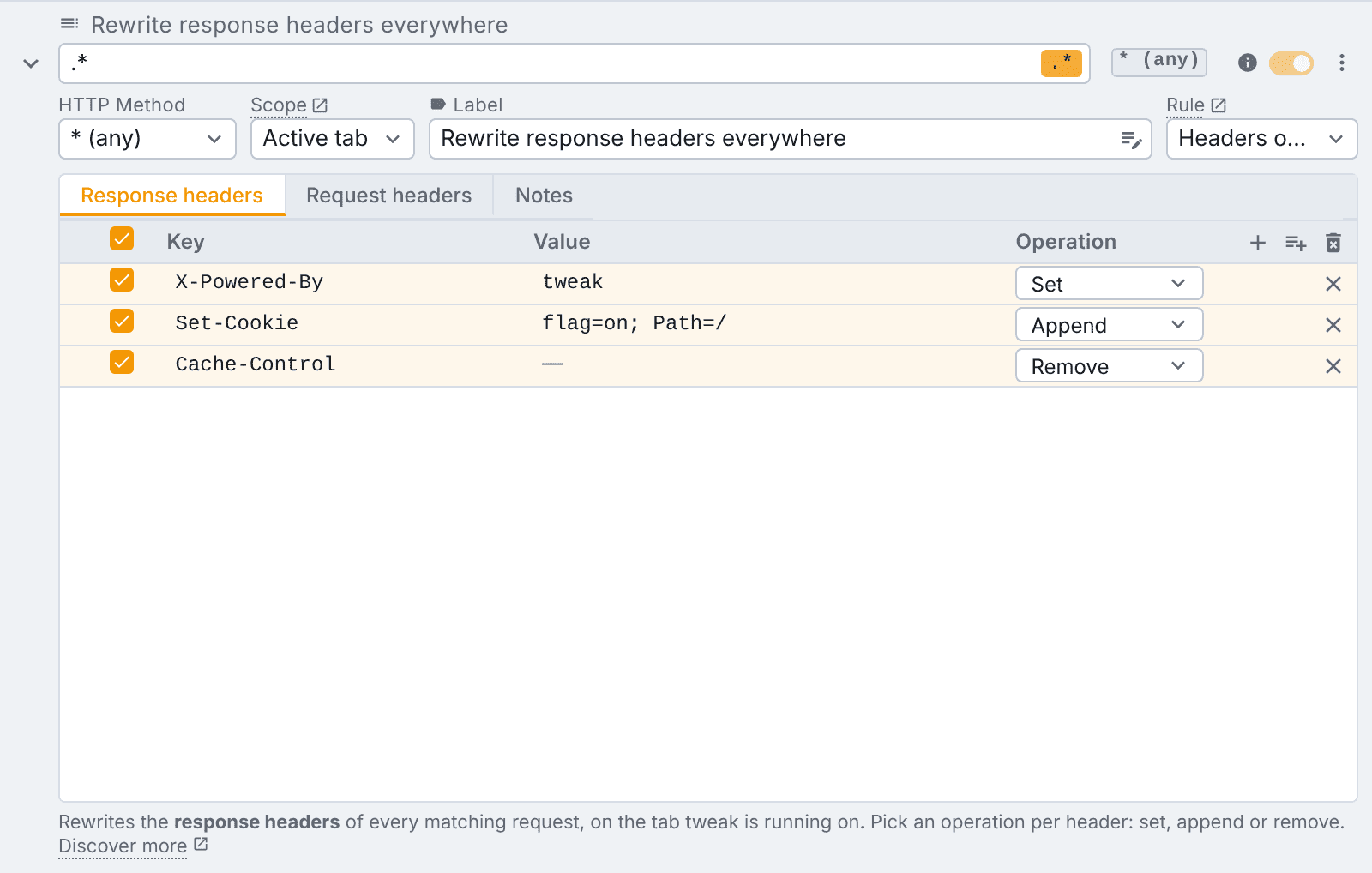
- Set, Append or Remove any request or response header. Each is a real operation, so a second
Set-Cookieand a removedContent-Security-Policysit side by side. - Every request, not just API calls. A header rule is applied by the browser itself, so it reaches page navigations, scripts, images, stylesheets and fonts, and it can set headers the page's JavaScript may not touch, like
Referer,OriginandUser-Agent. - A url and a method per rule, with plain text or regex matching.
- Two scopes. Active tab applies the rule only while tweak runs on that tab, so you never forget an override on. Global applies it on every tab and survives a restart, like ModHeader did.
- Paste headers in bulk from DevTools or a JSON object instead of typing them one by one.
- One click templates for CORS unblock, Disable cache, CSP audit and CSP off (templates).
Free: header rules are free on every plan, every operation and both scopes, with no account. ModHeader's profiles map to collections, which are part of Tweak Basic.
Limits: a header rule changes headers only: no body, no status code. For those, tweak has mock and modify rules next to it. tweak does not load on a short list of sites such as Google's own apps (known limitations).
Best for: developers who change headers today and will want a mock, a redirect or a blocked request tomorrow, in the same tool. Moving over is covered step by step in Goodbye ModHeader, hello tweak.
2. Simple Modify Headers
Simple Modify Headers is a free, open source extension for Chrome, Edge and Firefox that does one thing: add, modify or remove request and response headers.
What it does well: it is small and focused, and it has been around for years.
Limits: its own README lists what the move to Manifest V3 cost it on Chrome and Edge: the "add" and "modify" actions now behave the same, the cookie option was removed, and custom request filtering is gone.
Best for: someone who only ever needs a few headers and wants the smallest possible tool. Our Simple Modify Headers alternative post compares it with tweak in detail.
3. Requestly
Requestly is an HTTP interception platform: a browser extension, a desktop app, an API client and team workspaces. Its Modify Headers rule is one of many rule types, and its free plan covers header rules.
What it does well:
- ModHeader import. Requestly documents importing ModHeader profiles as rules, which is the quickest migration if you have many.
- Teams. Shared workspaces keep everyone's header rules in sync.
- Beyond the browser. The desktop app can modify traffic from other clients.
Limits: it is a much larger product than ModHeader was. If you only wanted a header switcher, there is more to learn. Paid plans are priced per user and aimed at teams.
Best for: teams that share header setups, and anyone who wants their ModHeader profiles imported in one step. See tweak vs Requestly and Requestly alternatives for the wider picture.
4. Staying on ModHeader
If ModHeader is still installed in your browser, removal from the store did not uninstall it. But it can no longer be installed from the Chrome Web Store or Edge Add-ons, the security reports recommend removing it, and a tool you cannot reinstall on a new machine is a tool your team cannot standardise on. Whether you pay for its Pro plan or not, we would not build a workflow on it today.
5. The browser's DevTools
For a one-off check you may not need an extension at all:
- Chrome DevTools can override response headers: right-click a request in the Network panel, pick Override headers, and edit the values. A
.headersfile can apply overrides to many urls with wildcards. - Firefox DevTools has Edit and Resend, which changes a request's method, url, headers or body and sends it again.
Limits: Chrome's overrides need a local folder and only change response headers; Firefox's edit applies to the one request you resend. Neither keeps a set of rules working across tabs and sessions.
Best for: checking that a header change fixes something, before you set up a rule for it. Our Network tab guide shows where these live.
Which one should you pick?
- You want ModHeader's job, free, plus room to grow: tweak header rules.
- You want the smallest header-only tool: Simple Modify Headers.
- Your team shares header profiles, or you have dozens to import: Requestly.
- You need it once: DevTools.
If you also mock API responses, see our list of the best Chrome extensions to mock API responses. Every tool we compare tweak with is on the alternatives page, and plans are on the pricing page.
FAQ
Why was ModHeader removed from the Chrome Web Store?
In July 2026, Microsoft and then Google removed ModHeader from the Edge Add-ons store and the Chrome Web Store after security researchers found a dormant browsing data collector in its official store build. Reports found no evidence that it had collected anything yet, but the code could have been switched on by a later update.
What is the best free ModHeader alternative?
tweak header rules are free on every plan with no account: set, append or remove request and response headers, per url, on the active tab or on every tab. Simple Modify Headers is a free, open source option if you only ever need headers. Requestly has a free plan that covers header rules too.
Can I import my ModHeader profiles?
Requestly documents an import of ModHeader profiles. tweak has no ModHeader importer, but a header rule accepts a block of headers pasted in bulk (as copied from DevTools or as a JSON object), so moving a profile takes a paste per rule.
Can I modify headers without an extension?
Partly. Chrome DevTools can override response headers locally (Override headers in the Network panel), and Firefox can edit the headers of a request and resend it. Neither is a rule that keeps applying to every matching request across tabs, which is what a header extension is for.
Try it
Install tweak on Chrome, Edge or Firefox, create a rule and switch it to Headers only. Read the header rule docs for the details. No account, no sign-up.
If you liked this article, consider sharing (tweeting) it to your followers.
Need something else? Request a feature