Best Chrome Extensions to Mock API Responses (2026)

You are building a screen against an API that is not ready, or you need to see what the page does on a 500, an empty list or a slow response. The fastest way to get there is a browser extension that answers the request for you, so the page receives your response as if the server had sent it.
There are dozens of extensions that claim to do this. This post covers the ones worth installing in 2026: what each does, what it is best for, what the free tier gets you and where it stops. I build tweak, so it comes first, but I will tell you when another tool is the better fit.
How we picked
Every extension on this list had to pass four checks:
- It mocks a response without a proxy. You set the status, the body and ideally a delay, and the page gets that instead of the real answer. No certificate, no system proxy.
- It is on the Chrome Web Store and still maintained. A tool that sits between your browser and every request should get updates. Abandoned extensions were left out.
- It needs no code change in your app. Libraries like Mock Service Worker are great, but they are a different category. We compared the two approaches in Mock Service Worker vs a browser extension.
- The free tier is useful on its own. You should be able to try it on a real task before you pay anything.
The short list
| Extension | Where it runs | Browsers | Free tier | Best for |
|---|---|---|---|---|
| tweak | Toolbar popup, no DevTools needed | Chrome, Edge, Firefox | 12 mock rules, plus header, redirect and block rules, no account | Quick mocks and error states on any site |
| Requestly | Extension and desktop app | Chrome, Firefox, Edge, Safari | Free plan for HTTP rules | Teams that share rules, traffic outside the browser |
| Mokku | DevTools panel | Chrome, Edge | Free, open source | Turning a logged call into a mock in one click |
| Moq | DevTools panel (or its own window) | Chrome, Firefox, Edge | Free, open source | Open source mocks with folders and JS hooks |
| Mockiato | DevTools panel | Chromium browsers | Free, open source | Simple mocks plus header profiles per environment |
1. tweak
tweak is a browser extension that mocks, modifies, redirects and delays HTTP requests without code. You open it from the toolbar, write a rule (a URL, a method, a status code, a body) and press play. Every matching fetch or XHR request on that tab gets your response.
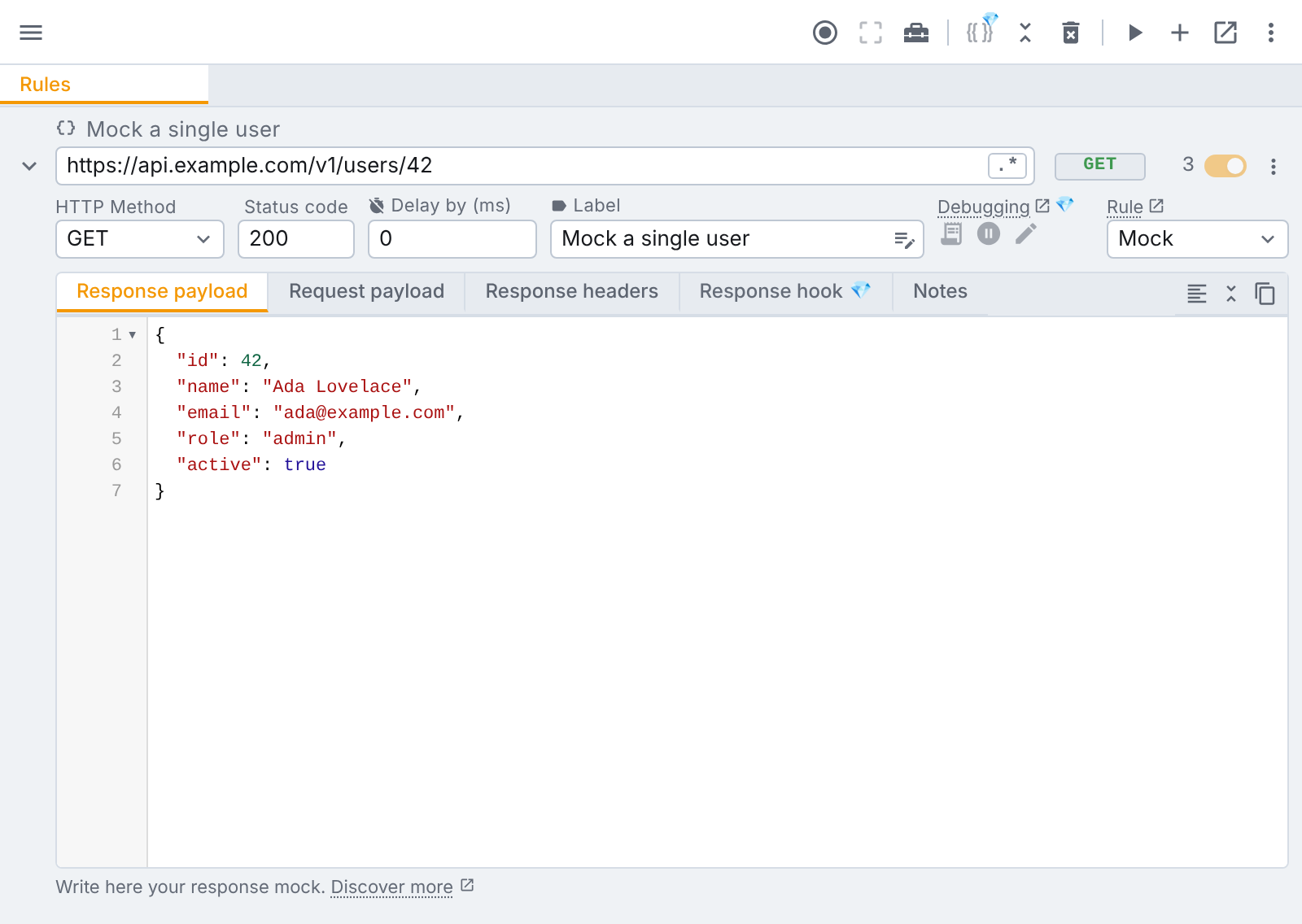
What it does well:
- No DevTools, no account. The rules live in the popup (or a floating window you can keep next to the page). Install it and you are mocking within a minute.
- Every failure in one rule. Status code, response body, response headers and a delay sit in the same row, so a
503after three seconds is one rule. - Rules from real traffic. Request capture records the tab's requests, and picking one prefills the whole rule with its URL, method, status, payload and headers. You can also paste a cURL command into the URL field, or import a HAR file.
- More than mocks. Header rules, redirects and block rules are applied by the browser itself, so they reach page navigations, scripts and images too, and all three are free.
- Room to grow. Modify rules call the real server and patch its answer, and GraphQL operations can be mocked one at a time (Tweak Basic). Pause & Edit, variables and JavaScript hooks are in Tweak Max.
Free tier: up to 12 mock rules, plus header, redirect and block rules, with no account. Tweak Basic ($2 a month) and Tweak Max ($4 a month) each come with a 7-day free trial; see pricing.
Limits: mock and modify rules work on fetch and XHR. tweak does not intercept requests made by service workers and does not rewrite the body of HTML, CSS or JavaScript files (a redirect can point them elsewhere). There is no team workspace: rules are shared by exporting a JSON file. The full list is in known limitations.
Best for: developers, QA and designers who want a mock or an error state on any site, in seconds, without opening DevTools.
2. Requestly
Requestly started as a browser extension for modifying requests and has grown into an API platform: an HTTP interceptor (browser extension and desktop app), an API client, and team workspaces. Its interceptor has a long list of rule types: modify the API response, modify headers, redirect, replace strings in URLs, cancel a request, delay it, insert scripts and more.
What it does well:
- Breadth. If a request can be changed, Requestly probably has a rule type for it.
- Beyond the browser. The desktop app can intercept traffic from other clients, which an extension alone cannot.
- Collaboration. Shared workspaces keep a team's rules in one place.
Free tier: Requestly has a free plan centred on its HTTP rules. Paid plans are priced per user and aimed at teams; check its pricing page for the current details.
Limits: the breadth comes with a bigger interface and more concepts to learn. If you only need a mock in one tab, it can feel like more tool than the job needs.
Best for: teams that want shared rules, and anyone who needs to intercept traffic outside the browser. Read our full tweak vs Requestly comparison, or the wider list of Requestly alternatives.
3. Mokku
Mokku adds a tab to Chrome DevTools, next to the Network panel. It lists the page's calls, and one click turns a logged call into a mock you can edit: body, status, delay and headers.
What it does well:
- Click to mock. The log is right there, so going from "this call" to "this call returns an error" is quick.
- Dynamic responses. Mocks can be JavaScript functions that return different answers, and it supports GraphQL queries and mutations and URL patterns with parameters.
- Opt in per site. Its docs say it does nothing until you enable it for an origin.
- Open source (MIT), free, with an optional "mocks as code" mode (in beta) that syncs mocks to a folder as JSON.
Free tier: free.
Limits: it lives in DevTools, so DevTools has to be open while you work. Its focus is mocks and request headers, and it is listed for Chrome and Edge only.
Best for: developers who already work in the Network tab and want mocks one click away from the log.
4. Moq
Moq is an open source DevTools extension with a surprisingly full feature set: mock rules with wildcard, exact or regex matching, status, delay, headers and body; JavaScript response hooks; proxy rules that forward matches to another server; request recording; folders; and a CORS fix.
What it does well:
- Cross browser. Its README lists Chrome, Firefox and Edge.
- Hooks and passthrough. A hook can change the mock body or the real response.
- Organised. Nested folders, bulk enable and disable, import and export.
Free tier: free and open source.
Limits: it is a DevTools panel first (the toolbar icon points you to DevTools, though it can open in its own window). Its README notes that hooks run as page JavaScript, so a strict Content-Security-Policy may block them, and that rules do not sync across devices.
Best for: developers who want an open source tool with hooks and folders, on Firefox as well as Chrome.
5. Mockiato
Mockiato is another free DevTools extension. You set a URL pattern (regex supported), a method, a body, a status code, a delay and headers, and it answers matching requests. It also keeps header profiles, so you can switch between development, staging and production values.
What it does well: a small, visual tool with nothing to learn. Mocks and settings stay in the browser's local storage.
Free tier: free and open source (MIT).
Limits: it targets Chromium browsers through DevTools, and its feature set is deliberately simple: mocks and headers.
Best for: a lightweight mock panel when you do not need more.
Worth knowing: the browser's own overrides
You do not always need an extension. Since Chrome 117, DevTools can override the content of a fetch or XHR response: right-click the request in the Network panel, pick Override content, edit the saved file and reload. Firefox added network overrides in version 137.
They are fine for a one-off look. The catch: you choose a folder on disk first, each override is a file, there is no status code or delay field, and the setup lives in one DevTools window. Our Network tab guide shows where each of these lives.
ModResponse, from the makers of ModHeader, also mocks and replays responses. We could not confirm a current Chrome Web Store listing for it at the time of writing, so it is not ranked here.
Which one should you pick?
- You want a mock or an error state in the next minute, on any site: tweak.
- Your team shares rules every day, or you need to intercept a mobile or desktop app: Requestly, or a desktop proxy like Proxyman.
- You live in DevTools and want free and open source: Mokku or Moq. Moq if you also use Firefox.
- You need the mocks in your automated tests: none of these. Use Mock Service Worker in your codebase, and an extension for the manual checks.
If headers are the only thing you change, see ModHeader alternatives instead. And for a side by side of every tool we compare tweak with, see the alternatives page.
FAQ
What is the best Chrome extension to mock API responses?
It depends on where you work. tweak is the quickest to reach for: it runs from the toolbar, needs no account, and also handles headers, redirects and blocked requests. Requestly suits teams that want shared workspaces and a desktop app. Mokku, Moq and Mockiato are free, open source DevTools panels for developers who already live in the Network tab.
Can I mock an API response in Chrome without an extension?
Yes. Since Chrome 117, DevTools can override the content of a fetch or XHR response from the Network panel (Override content), and Firefox has had network overrides since version 137. Both save the response to a local file and serve it back. They are fine for a quick look, but they take a few steps per request and live in one DevTools window.
Do these extensions work on Firefox and Edge too?
Some do. tweak runs on Chrome, Edge and Firefox. Requestly has extensions for several browsers plus a desktop app. Moq lists Chrome, Firefox and Edge. Mokku has Chrome and Edge listings, and Mockiato targets Chromium browsers.
Is there a free extension to mock API responses?
Yes. tweak is free for up to 12 mock rules, with header, redirect and block rules on top and no account. Mokku, Moq and Mockiato are free and open source. Requestly has a free plan for its HTTP rules, with paid plans aimed at teams.
Try it
Install tweak on Chrome, Edge or Firefox and mock your first response. The free plan gives you 12 mock rules, no account required.
If you liked this article, consider sharing (tweeting) it to your followers.
Need something else? Request a feature