Import and Export Rules
You can easily back up, transfer, or share your tweak rules using the import and export functionality. Export your rules to reuse them across devices or collaborate with others.
Import Rules
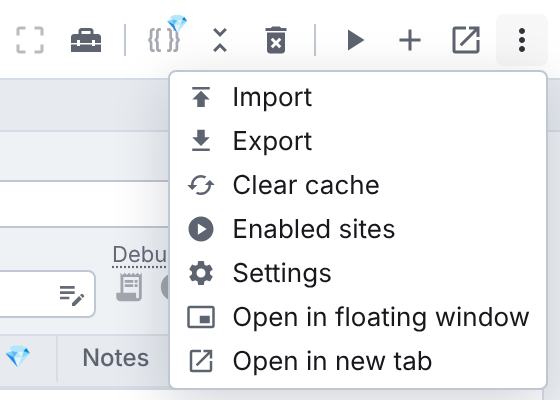
To import rules, open the more options menu (the three dots at the top right) and choose "Import". This opens a new tab where you can upload a .json file. Once uploaded, the rules will be added to your Tweak extension automatically.
Paste JSON instead of a file
Rules you have as text, from a colleague's message or an AI chat, do not need saving to a file first. Open the import page and paste: Ctrl + V (⌘ + V on Mac) anywhere on the page imports at once. You can also paste into the "or paste JSON" box and press Import JSON (or Ctrl/⌘ + Enter). If the text is not valid, it stays in the box so you can fix it in place and try again.
Export Rules
To export your rules, open the more options menu (the three dots at the top right) and choose "Export". This will download a .json file containing all your tweak rules.
Working with Collections
This functionality is available on Tweak Basic and Tweak Max. Compare the plans here.
Collections help you organize your tweak rules into folders for better structure and manageability. You can also import/export rules within a specific collection. Learn more here.
Importing HAR Files
What’s a HAR file? Learn more here.
Tweak also supports importing HAR files. When you import a HAR file, Tweak automatically extracts and converts relevant requests into rules. Just follow the same steps as importing a .json file.
Need something else? Request a feature