Resource Override Alternative: Redirect Any Request With tweak

Resource Override has been the go-to extension for one simple job for years: take a file a website loads and serve a different one instead. Point a production script at your local build, swap a stylesheet, send an API call to localhost. If that is why you installed it, this post shows how tweak's redirect rule does the same job, and why it holds up better today.
What happened to Resource Override
Resource Override is not maintained anymore. Its own README now opens with "Development on RO has stopped indefinitely", and the author says the last commit is the last one. The code had not seen a real change since April 2022.
That matters more than it sounds. Browsers moved extensions to Manifest V3, a new platform with new rules for how an extension may touch network requests. Resource Override was built on the old one. Its author pointed to an MV3 branch, but called it untested and said it would not be supported.
You can see the cost in its open issues: "URL -> File does not work", "Options button doesn't work", "Chrome flagging as not following best practices", rules not applying in a second tab group, and reports of it not working on Firefox and Edge. None of these will be fixed.
If a tool sits between your browser and every request it makes, you want it to be maintained.
Resource Override vs tweak at a glance
| Resource Override | tweak | |
|---|---|---|
| Maintained | No, stopped in 2024 | Yes, regular releases |
| Manifest V3 | Untested branch only | Yes, on every browser |
| Browsers | Chrome, Firefox | Chrome, Edge, Firefox |
| Redirect a url to another url | Yes | Yes |
| Keep path and query on redirect | Manual | Automatic when you type an origin |
| Regex with capture groups | No, wildcards only | Yes |
| Pick which request types to catch | No | Yes: scripts, styles, images, fonts, API calls, pages, more |
| Active tab only or always on | Per tab group | Active tab or Global |
| Mock an API response | No | Yes |
| Modify request and response headers | Yes | Yes, free |
| Account needed | No | No |
| Price | Free | Redirects free, paid plans for advanced features |
The redirect rule is the Resource Override rule
In Resource Override you write a "URL -> URL" rule: when the page asks for this, give it that. In tweak, that is a Redirect rule. You type a url expression, then where it should go:
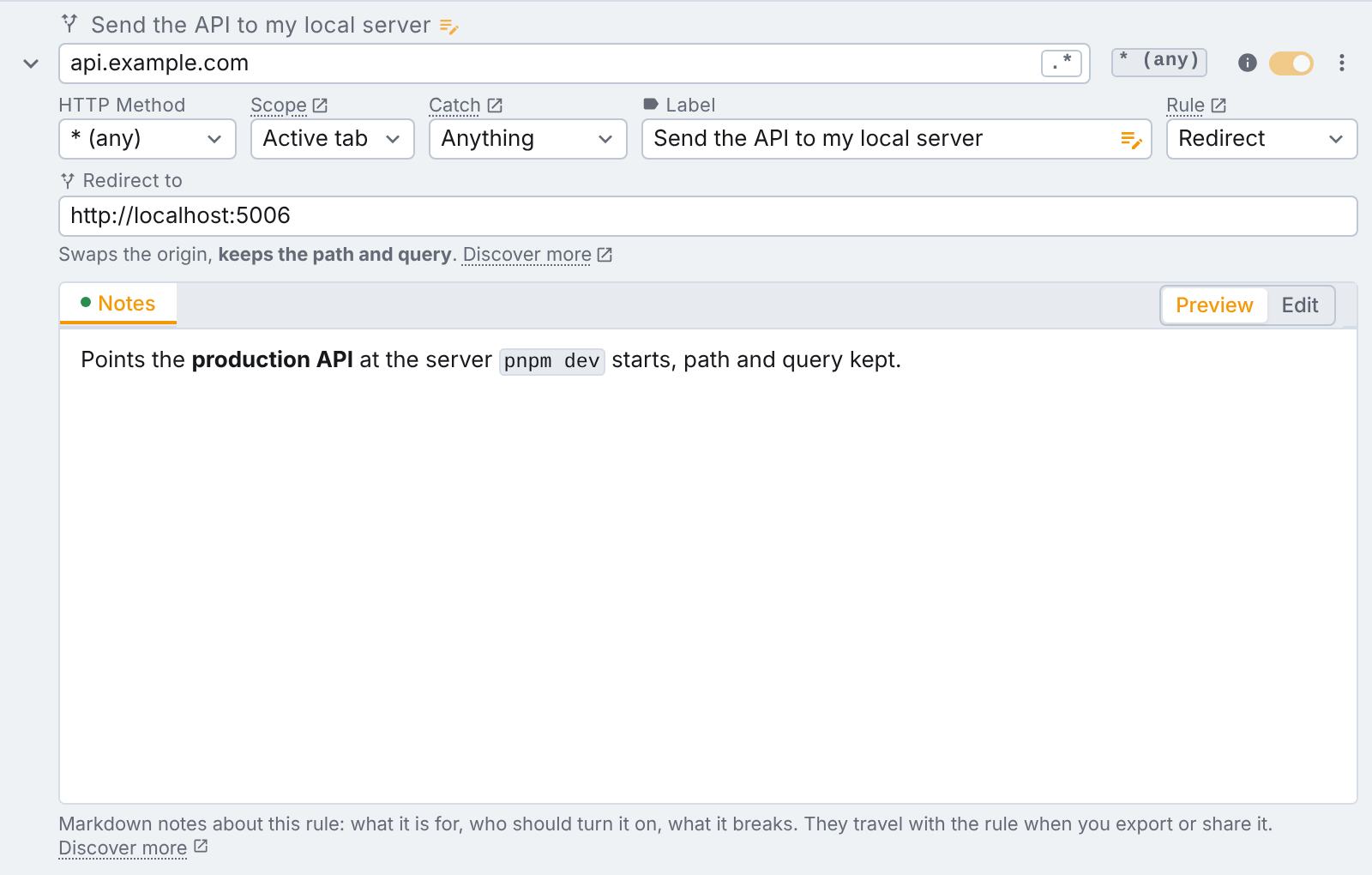
The redirect is applied by the browser itself, not by a script running inside the page. So it reaches everything the page loads, not only the requests your JavaScript makes: the page navigation, <script> tags, stylesheets, images and fonts.
What you type decides what happens
There is no mode to pick. tweak reads what you typed and tells you, right under the field, what it will do:
| What you type | What happens |
|---|---|
http://localhost:3000 | Swaps the origin and keeps the path and query. |
https://example.com/fixtures/users.json | Sends every match to that exact url. |
/v2/users, ?debug=1, #top | Rewrites just that part of the url and keeps the origin. |
The first row is the one most people want. "Send my API to localhost" should turn https://api.example.com/users?page=2 into http://localhost:3000/users?page=2. In Resource Override you had to get the wildcards right to keep the path. In tweak you type the origin and you are done.
Regex with capture groups
Resource Override matches with * wildcards. tweak gives you a real regular expression, and the target can use its capture groups. Turn the regex toggle on and \1, \2… refer to the groups of your expression:
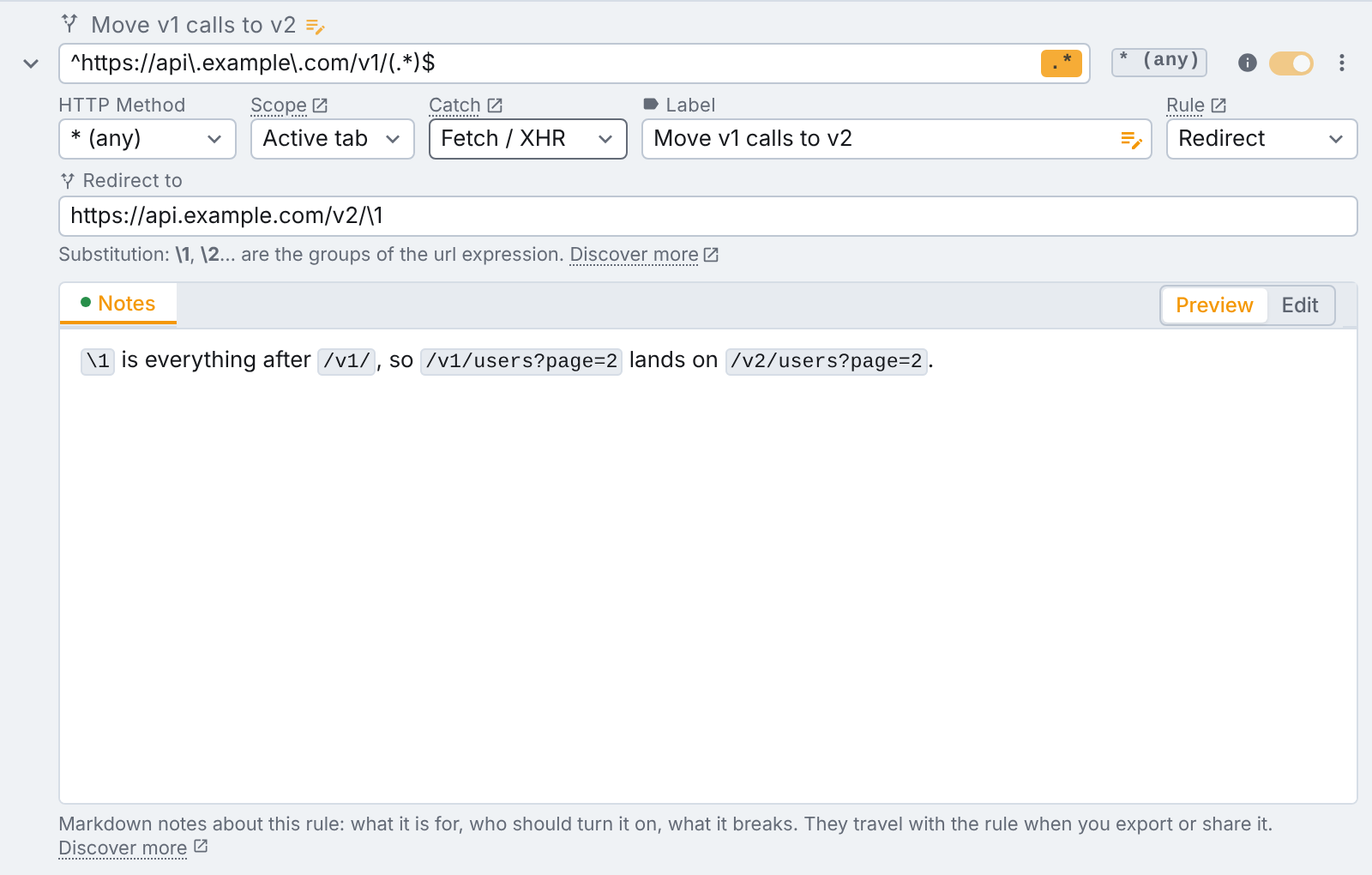
One rule can move every /v1/ call to /v2/, whatever comes after it.
Catch only what you mean to
A broad expression in Resource Override overrides every request it matches, whatever it is. tweak lets you pick the kind of request a rule applies to with Catch:
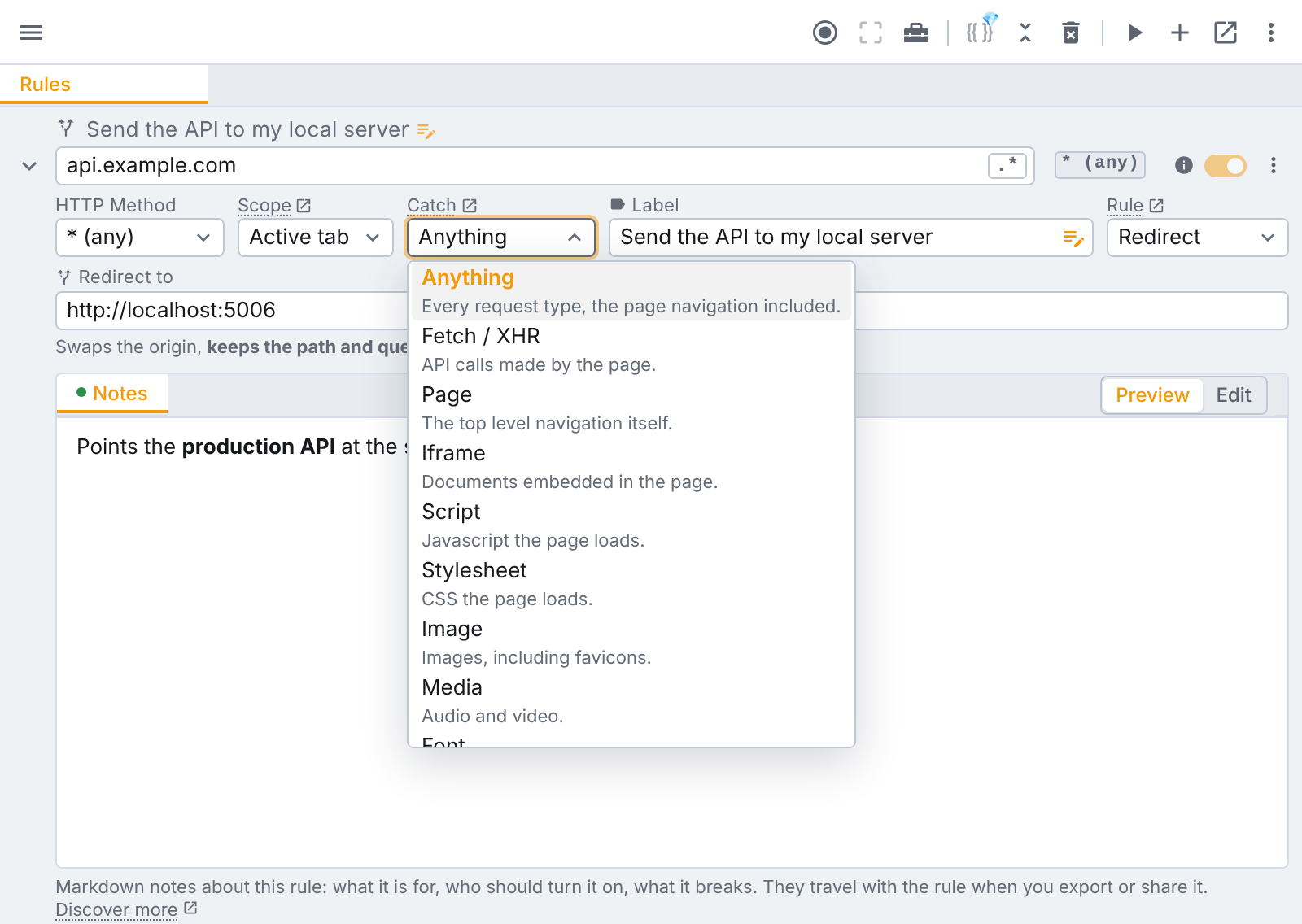
Pick Script to swap a bundle without touching the API calls on the same domain, or Image to break images on purpose and see how the page copes. Anything is the default, and every option is free.
Active tab or always on
Each redirect rule has a Scope. Active tab applies it only while tweak is running, on that tab, so you never forget an override on and wonder why a site looks wrong a week later. Global applies it on every tab and survives a browser restart, for the override you want always on.
Common Resource Override tasks, in tweak
Load your local build on a production site. Expression cdn.example.com/app.js, Catch Script, redirect to http://localhost:5173/app.js. Reload the page and you are debugging your own code against real data.
Point an app at a local backend. Expression api.example.com, redirect to http://localhost:3000. The path and query come along.
Serve a fixture instead of a live endpoint. Redirect one endpoint to a static JSON file your dev server hosts.
Test a new version of an API. A regex expression with a capture group turns /v1/ into /v2/ across the board.
What tweak does that Resource Override never did
Redirecting is one rule type. When you need more than "go somewhere else", the same extension has it:
- Mock rules: return your own response, status code and body, with no server at all. No local file needed.
- Modify rules: call the real server, then patch the response before the page reads it (Tweak Basic).
- Headers only rules: set, append or remove request and response headers, free.
- Block rules: cancel a request outright to see how the page handles a failure.
- Variables: one
{{api_host}}variable can re-point every redirect rule you have (Tweak Max).
Resource Override's "URL -> File" rule served inline text you typed into the extension. In tweak, a mock rule does that job for API calls, with a real JSON editor. For a whole script or stylesheet, serve it from your dev server and redirect to it.
Moving over
- Install tweak on Chrome, Edge or Firefox.
- For each "URL -> URL" rule in Resource Override, create a Redirect rule in tweak with the same source and target.
- Replace
*wildcards with a plain url fragment, or turn on regex if you need more control. - Pick Active tab while you test, and Global for the ones you want always on.
- Switch Resource Override off, so two extensions are not fighting over the same request.
No account and no sign-up. Redirect rules are free, with every Catch option, on every plan.
The bottom line
Resource Override did one job well for a long time, and a lot of developers learned to debug production with it. But it is no longer maintained, it was built for a platform browsers are leaving behind, and its open bugs will stay open.
tweak's redirect rule covers the same job on Manifest V3, on Chrome, Edge and Firefox, with smarter targets, real regex, request type filtering and a clear scope. And when a redirect is not enough, mocks, modify rules and header rules are right next to it.
Read the redirect rule docs or try tweak free.
If you liked this article, consider sharing (tweeting) it to your followers.
Need something else? Request a feature