How to Fix CORS Errors in Your Browser

You call an API from your frontend, the request shows up in the Network tab with a perfectly good response, and your code still gets nothing but this in the console:
Access to fetch at 'https://api.example.com/orders' from origin 'http://localhost:5173'
has been blocked by CORS policy: No 'Access-Control-Allow-Origin' header is present on
the requested resource.
This post explains what the browser is doing, how to read the variations of that message, how to fix it properly, and how to get unblocked right now while you develop, with one click.
What CORS is, in one minute
Browsers apply the same-origin policy: a page on http://localhost:5173 may send a request to https://api.example.com, but it may not read the response unless that server says it is fine. An origin is the scheme, host and port together, so localhost:5173 and localhost:3000 are different origins too.
CORS (Cross-Origin Resource Sharing) is how the server says it is fine: with Access-Control-* response headers. No header, no access. The request usually did reach the server, which is why you see a response in DevTools, but the browser refuses to hand it to your JavaScript.
Two consequences matter for debugging:
- CORS is enforced by the browser, not the server. The same request works from
curlor Postman, because they are not browsers. "It works in Postman" tells you nothing about CORS. - The fix is a header on the response. Nothing you change in your frontend
fetchcall will make a missing header appear.
Preflight requests
For anything beyond a simple GET or form POST (a PUT, a DELETE, a JSON body, an Authorization header, a custom header), the browser first sends an OPTIONS request, the preflight, asking for permission. The server must answer it with a successful status and the right headers, or the real request is never sent. In the Network tab, you will see the preflight as a separate row with the method OPTIONS.
Reading the error message
The console message tells you exactly which check failed. The common ones:
| Message contains | What is wrong |
|---|---|
No 'Access-Control-Allow-Origin' header is present | The response has no CORS headers at all |
Response to preflight request doesn't pass access control check | The OPTIONS request failed: missing headers, or a non-2xx status (often 404 or 405) |
Method PUT is not allowed by Access-Control-Allow-Methods | The preflight answer does not list your method |
Request header field authorization is not allowed | The preflight answer does not list a header you send |
must not be the wildcard '*' when the request's credentials mode is 'include' | You send cookies (credentials: 'include'), so the server must name your origin, not * |
The 'Access-Control-Allow-Origin' header contains multiple values | Two layers (app and proxy) both add the header |
Firefox words them differently ("Cross-Origin Request Blocked … Reason: CORS header 'Access-Control-Allow-Origin' missing"), but the reasons map one to one.
The right fix: the server
In production, CORS is fixed where it is enforced from: the server's response. Configure your API (or the gateway in front of it) to answer with:
Access-Control-Allow-Origin: https://app.example.com
Access-Control-Allow-Methods: GET, POST, PUT, DELETE, OPTIONS
Access-Control-Allow-Headers: Content-Type, Authorization
Access-Control-Allow-Credentials: true
Every framework has a middleware for it (cors for Express, django-cors-headers, rack-cors, Spring's @CrossOrigin...). Two rules: name the origins you trust instead of reflecting whatever the request sends, and make sure OPTIONS requests reach the middleware rather than a 404 route.
In local development: a proxy
If the API is yours and you only hit CORS on localhost, the cleanest fix is often to stop being cross-origin. Every dev server can proxy API calls through its own origin:
// vite.config.js
export default {
  server: {
    proxy: {
      '/api': { target: 'https://api.example.com', changeOrigin: true },
    },
  },
}
Your code calls /api/orders, the dev server forwards it, and the browser sees a same-origin request. webpack's devServer.proxy and Next.js rewrites do the same.
When you cannot change the server
Often the API is not yours: a third-party service, a staging backend owned by another team, a production API you are debugging against from localhost. Asking for a CORS change takes days. You need to keep working now.
What not to do
mode: 'no-cors'does not fix anything. It makes the request succeed with an opaque response: your code cannot read the body or the status. It only silences the error.- Launching the browser with web security disabled (
--disable-web-security) turns off the same-origin policy for every site in that profile, including your bank. If you do it, use a throwaway profile and never browse with it. - Public CORS proxies send your requests, and whatever tokens they carry, through someone else's server.
Unblock CORS with tweak's CORS unblock template
tweak can add the CORS headers to responses in your browser, on the requests you choose, without touching the server and without disabling anything globally. You do not have to know which headers: there is a ready-made template for it.
- Install tweak and open it on the tab where the error happens.
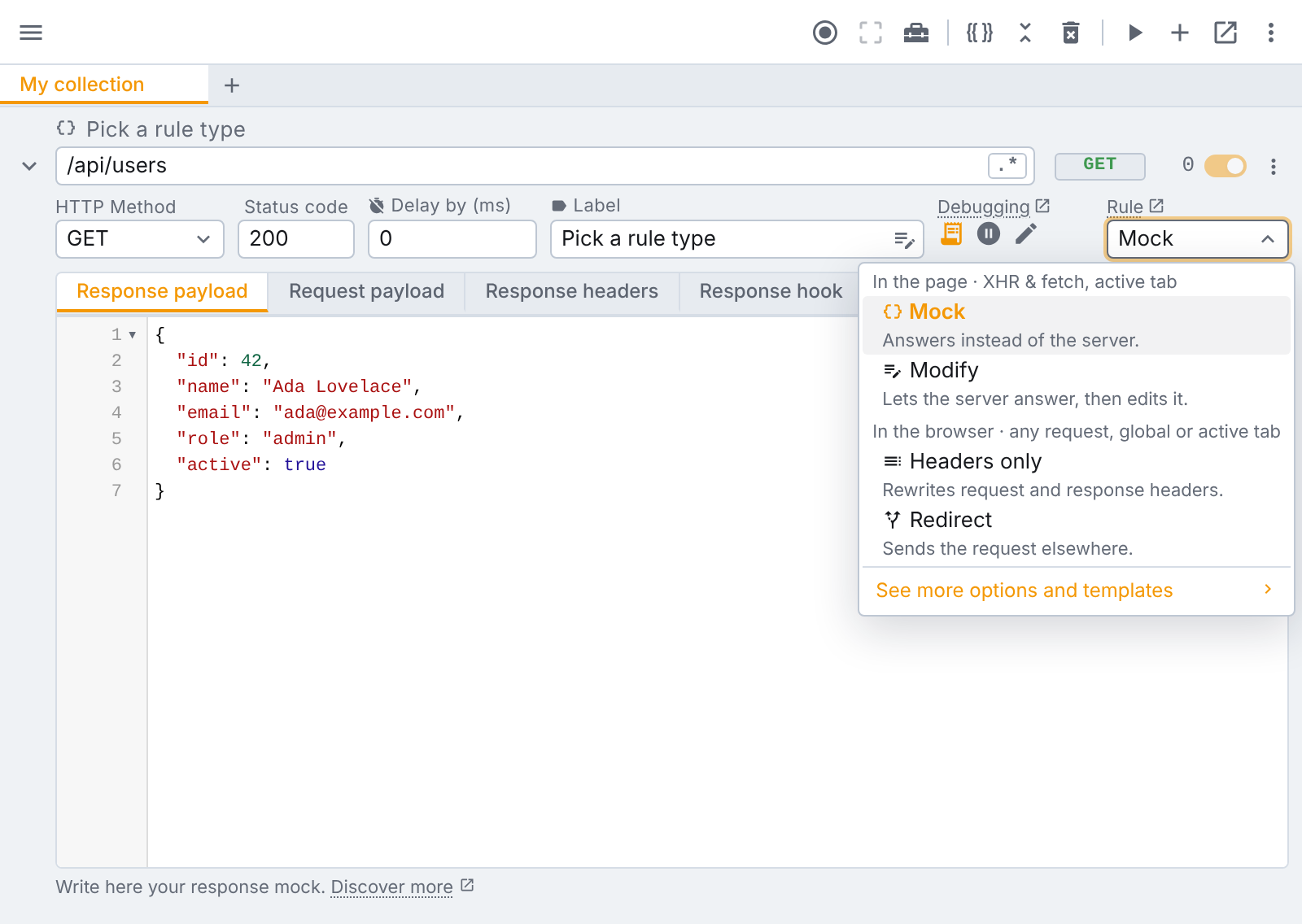
- Add a rule, open its rule type list, and click See more options and templates under it.
- Search
corsand pick CORS unblock. - Start tweak on the tab and reload the page.
The template turns the rule into a headers only rule that sets four response headers:
Access-Control-Allow-Origin: *
Access-Control-Allow-Methods: GET, POST, PUT, PATCH, DELETE, HEAD, OPTIONS
Access-Control-Allow-Headers: *
Access-Control-Expose-Headers: *
These are applied by the browser itself, so they reach every request on the tab, not only fetch and XMLHttpRequest. The rule is free, on every plan, and it arrives with notes explaining what it does.
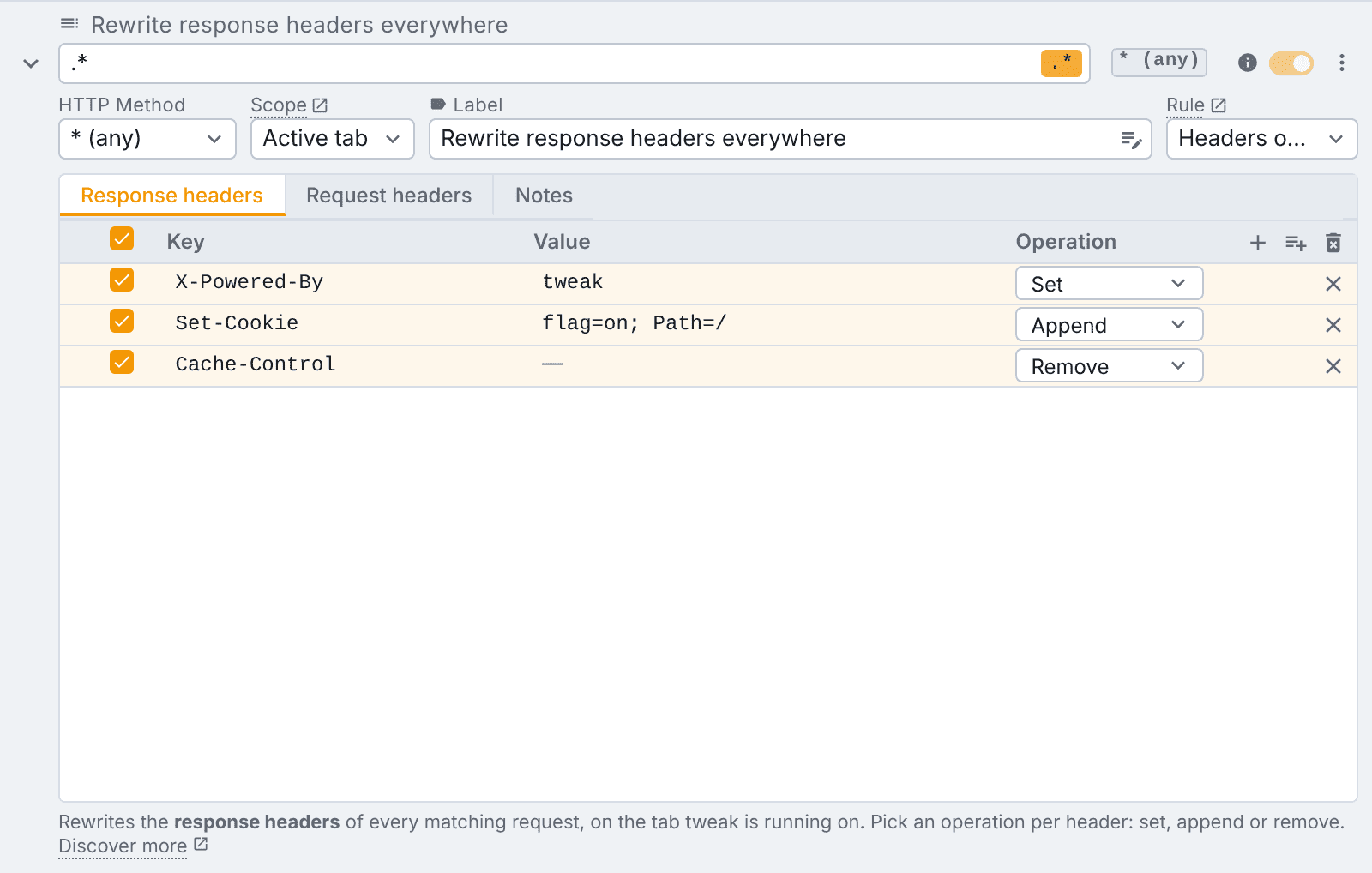
After that it is an ordinary rule you can edit. Three edits worth making:
- Narrow the url. The template matches every url (
.*). Change it to your API's host, for exampleapi\.example\.com, so only those responses are touched. - Keep the scope on Active tab. That is the default: the headers only apply on the tab where tweak is running, and stop when you stop tweak. Global applies them everywhere, all the time, which is easy to forget.
- Add
Authorizationif you send it. By the CORS standard,Access-Control-Allow-Headers: *does not cover theAuthorizationheader. If your preflight still fails on it, change that row's value to*, Authorization.
What the template deliberately does not do
- Cookies and credentials. A request with
credentials: 'include'is refused when the response saysAccess-Control-Allow-Origin: *, and the browser requiresAccess-Control-Allow-Credentials: trueon top. The template ships without that row on purpose:*is the only origin it can set for every site, and the combination would look like it works while the browser still refuses it. For a credentialed API, edit the rule: setAccess-Control-Allow-Originto your page's exact origin (http://localhost:5173) and add anAccess-Control-Allow-Credentials: truerow. - A preflight the server rejects. If the server answers
OPTIONSwith a404or405, adding headers does not change the status, and the browser still refuses. Fix the server, or use the next option.
Or skip the network entirely: mock the response
If what you need is the data, not the real server, a Mock rule answers the request inside the page with the payload you give it. The request never leaves the browser, so there is no cross-origin response and no CORS check at all. Use request capture to record the real response once and prefill the mock from it.
Checklist
- Read the console message: which check failed?
- Open the Network tab: is there an
OPTIONSpreflight, and what did it return? - Your server? Fix the headers there, or proxy through your dev server.
- Not your server? Use tweak's CORS unblock template, narrowed to the API's url, on the active tab.
- Sending cookies? Name the exact origin and add
Access-Control-Allow-Credentials: true. - Only need the data? Mock it, and CORS never comes up.
CORS errors feel like the browser is in the way. It is doing its job: protecting your users from pages reading what they should not. While you develop, though, it is fine to tell your own browser to relax, on your own tab, for the requests you pick. That is one click with tweak.
If you liked this article, consider sharing (tweeting) it to your followers.
Need something else? Request a feature