Matching requests by their payload
This functionality is available on Tweak Basic and Tweak Max. Compare the plans here.
Mocking GraphQL? Contains is how you mock one operation at a time: match /graphql plus its operationName. See GraphQL.
A URL and a method are often not enough to tell requests apart. Every GraphQL query goes to the same /graphql, and a search endpoint answers every filter on the same URL. The Request payload tab is how a rule picks the requests it means by their body.
The payload is a filter
On the Request payload tab, the editor holds a filter: a rule only catches a request whose body matches it.
How the body has to match is picked in the bar above the editor, Body: Any | Equals | Contains:
| Mode | Catches |
|---|---|
| Any (default) | every request on the rule's URL and method, the body is not checked |
| Equals | only a body strictly equal to the payload |
| Contains | any body that includes the fields you list, whatever else it has |
The sentence next to the switch always says which mode is active, and while the payload is not empty and the mode is Equals or Contains, the tab carries an equals or contains chip, so you can tell from any tab how a rule matches.
Contains is only available on Tweak Basic and Tweak Max (see our plans). On the free plan it is shown with a 💎 and opens the upgrade prompt.
Any body
Any says out loud that the rule matches on URL and method only. The editor gives way to a short note, Any body, with a Filter by body button that switches the rule to Equals.
- A new rule starts on Any. It catches every request on its URL and method until you choose to filter by the body.
- A rule with an empty payload is treated as Any. An empty filter matched every body before, and it still does, so rules you already had keep doing exactly what they did. The bar now just says so.
- A payload handed to a rule switches it to Equals. Picking a request from request capture, pasting a cURL command with a body, or importing a payload from Data X-Ray fills in the payload and filters by it.
- Switching to Any keeps your payload. It is ignored while Any is on, and comes back when you switch to Equals or Contains.
A rule exported with Any cannot be imported into an older version of tweak. Update tweak on both sides before sharing rules.
On a mock rule
A mock rule never sends the request, so its payload does one thing only: decide which requests get the mocked response.
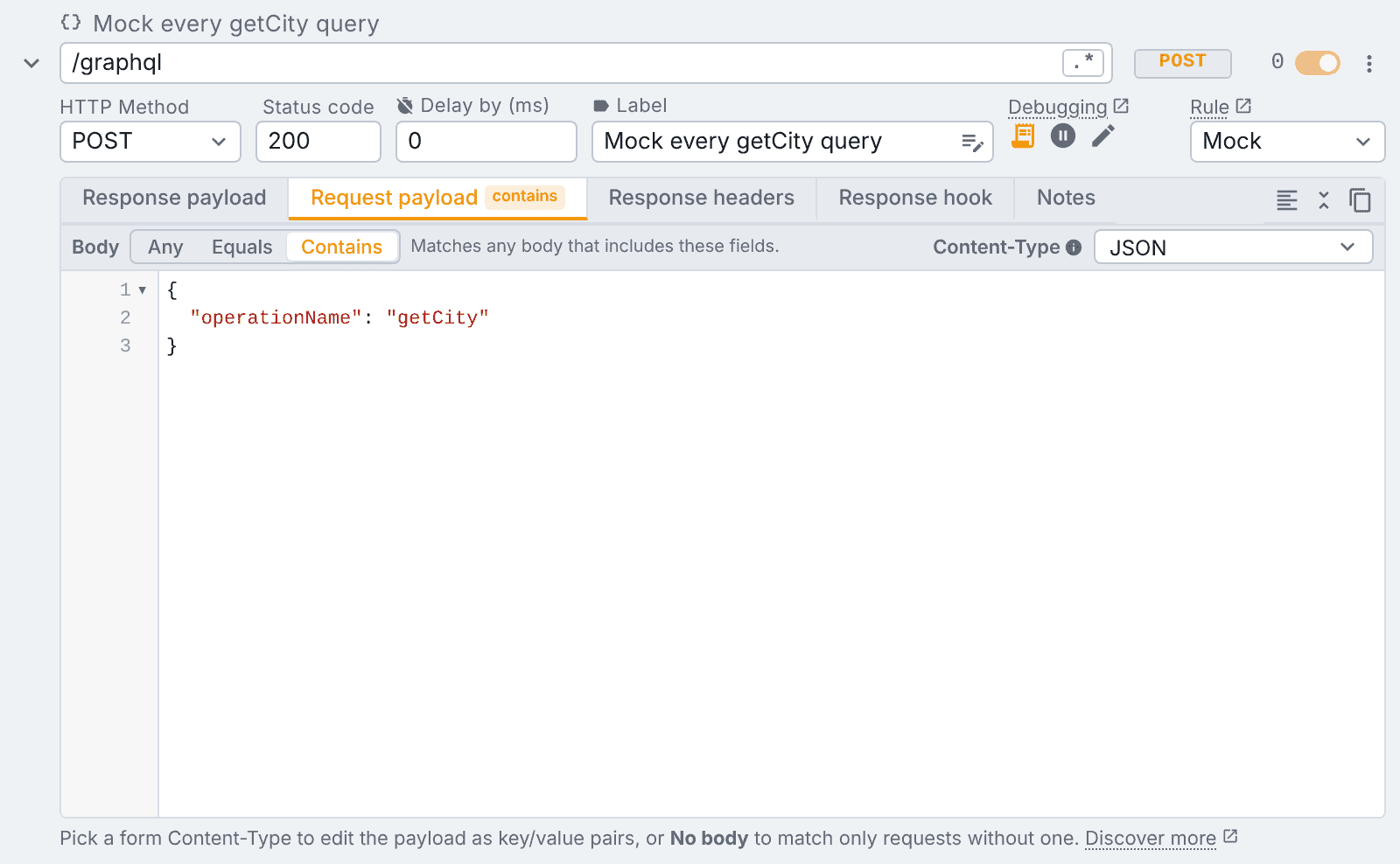
With Contains and the payload { "operationName": "getCity" }, this rule mocks every getCity query, whatever variables it carries:
{ "operationName": "getCity", "variables": { "id": "100" } }
{ "operationName": "getCity", "variables": { "id": "345" } }
A getCountry query on the same /graphql goes through untouched. With Equals it would only catch a body that is exactly { "operationName": "getCity" }, which a real GraphQL client never sends, so Contains is usually what you want here. One rule per operation, all on the same URL, is how you mock a GraphQL API one query at a time (see GraphQL).
On a modify rule
A modify rule calls the server, so its Request payload tab has two editors side by side:
- Filter by is the same filter as on a mock rule, with the same Any, Equals or Contains switch. It decides which requests the rule catches. Under Any it gives way to the Any body note.
- Replace by is the body sent to the server instead, once a request matched. Leave it empty to send the original body. It stays under Any too, so a rule can replace the body of every request on its URL.
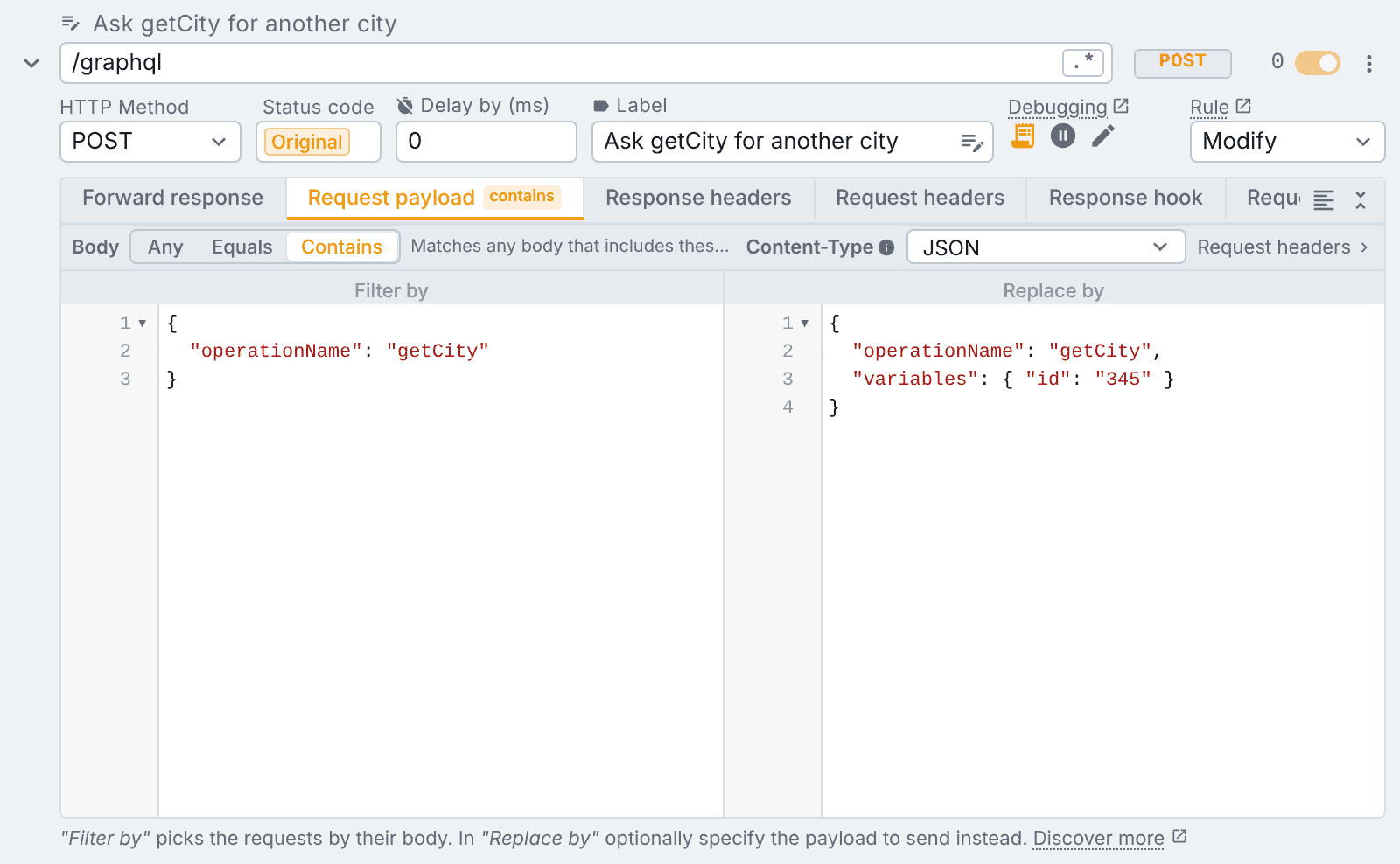
Here every getCity query matches, whatever city it asked for, and goes out to the server asking for city 345 instead. The two editors are independent: the filter never changes what is sent, and Replace by never changes what matches. Replace by swaps the whole body, so write the complete payload you want the server to receive, not only the fields that change. A GET or HEAD request has no body, so Replace by does nothing on one.
To change a single field and keep the rest of whatever the page sent, use a request hook instead. To change one request by hand, just once, use Pause & Edit.
Things to know
- Under Contains,
{}and[]match every JSON body. tweak warns you in the bar until you add the fields to match on. - A form post (
application/x-www-form-urlencodedormultipart/form-data) is matched field by field, in any order, under Equals and Contains. See form request bodies. - The No Body body type matches only requests that send no body. It has no Any, Equals or Contains to pick.
- Variables work in both editors.
Need something else? Request a feature