How to Intercept and Edit HTTP Requests Before They Are Sent (No Proxy Needed)

You want the next request to go out a little differently. A bigger quantity, an expired token, someone else's id, a field the backend does not support yet. Not forever, just this once, to see what happens.
That is a request breakpoint: stop the request in flight, edit it, let it go. Desktop proxies have done this for twenty years, but they ask you to reroute your traffic and trust a certificate first. This guide shows how to do it from inside the page with tweak's Edit before send, which use cases it covers, and how it compares, feature and price, with Charles, Fiddler, Proxyman, Burp Suite and the free tools.
I'm the founder of tweak, so read this with that in mind. Several tools in this article are industry leaders that have proven themselves for years, and I would not mention them if they weren't good. This article is not about crowning a winner. It is about helping you pick the right tool for the job in front of you. The most expensive tool is not always the right answer: sometimes all you need is a small, focused tool that does one specific task well.
TL;DR
- Edit before send pauses a matching
fetchor XHR request on the page. You change the URL, body or headers, then press Continue request. You can also pause the response and rewrite it before your app reads it. - No proxy, no certificate, no DevTools required. The editor opens over the page, in the tab you are working in.
- Edits are one-off. They never change the rule, so the next request behaves as saved.
- Price: $36 a year or $4 a month. That is 93% less than Burp Suite Professional, 75% less than Fiddler Everywhere Pro, and less than a Proxyman or Charles license in year one. Try it free for 7 days.
Why DevTools is not enough
Most developers try the browser's own tools first, and hit the same wall:
| What you try in DevTools | What it actually does |
|---|---|
| XHR/fetch breakpoints (Sources) | Pauses your JavaScript at the fetch call. You can poke variables, not the request. |
| Local Overrides | Replaces a response with a file on disk. Every time, not once. Requests are untouched. |
| Copy as fetch / cURL, then edit | Replays a request that already went out, outside your app's flow. |
| Edit and Resend (Firefox) | Same: a new request after the fact, the page never sees the answer. |
None of them hold the real request your app is sending, let you change it, and hand the edited version back to your app's flow. That gap is why people go looking for "Tamper Data for Chrome", a Charles Proxy alternative, or an intercept tool like Burp.
How to set up Edit before send, step by step
You need tweak installed and a Premium plan (the 7 day trial works).
1. Create a rule that matches the request
Open tweak on the tab running your app and add a rule:
- URL: part of the request URL, for example
/api/cart. Partial matching is the default, or switch on the regular expression toggle for something stricter. If request capture is on, the URL field suggests the requests the tab already made. - Method: the HTTP method, for example
POST. - Rule type: Modify to edit real traffic that goes to your server. Mock if you want tweak to answer instead of the server (useful when the backend is down or not built yet).
Tip: if several requests share a URL (GraphQL, batch endpoints), narrow the rule with partial request payload matching so only the operation you care about pauses.
2. Choose where the rule should stop
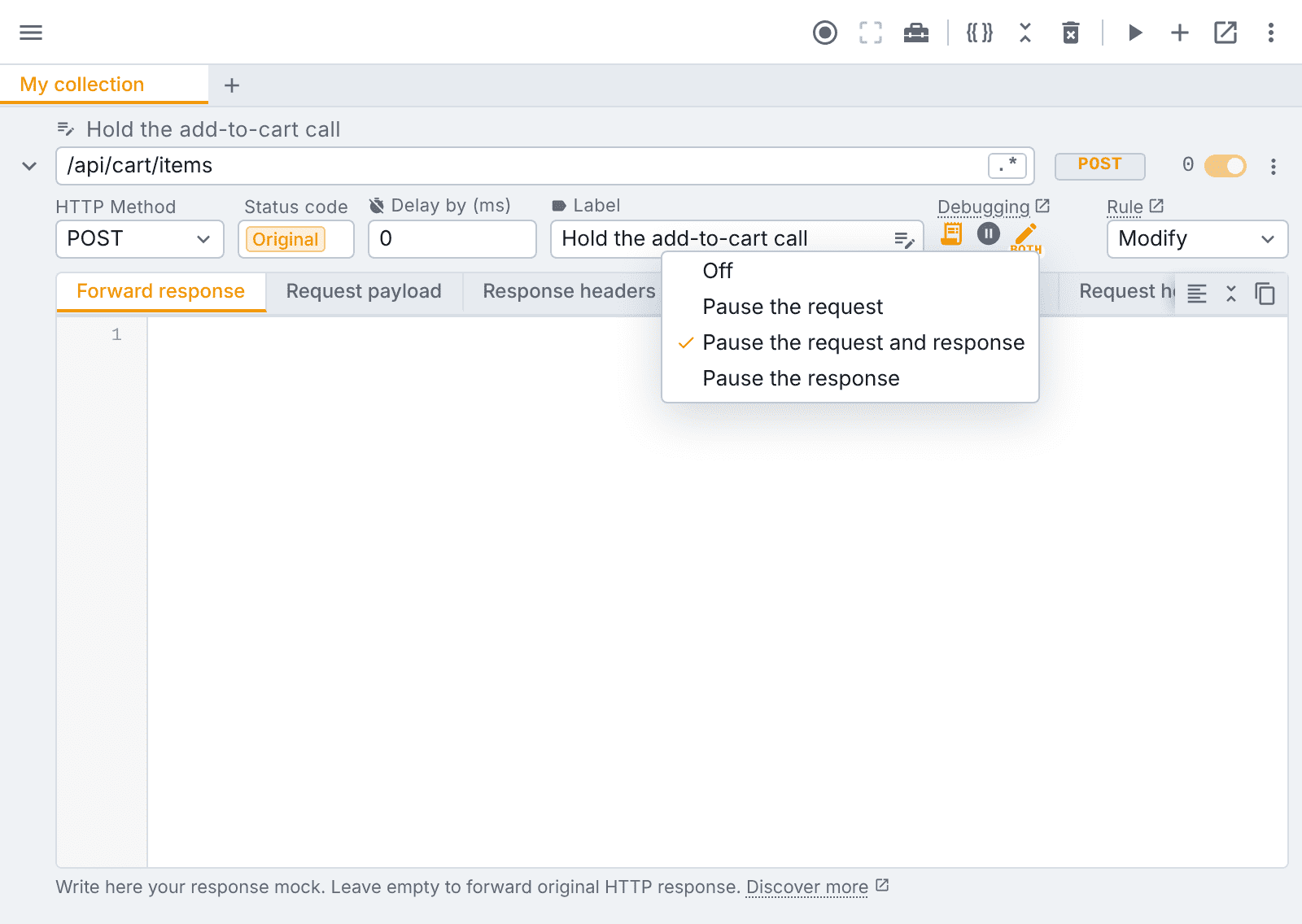
In the rule's debugging group, next to the breakpoint, open the Edit before send menu:
| Option | What pauses |
|---|---|
| Pause the request | the request, before it leaves the page |
| Pause the request and response | the request first, then the response before the page reads it |
| Pause the response | the response only, before the page reads it |
A small req, both or res caption under the icon reminds you the rule is armed.
3. Trigger the request and edit it
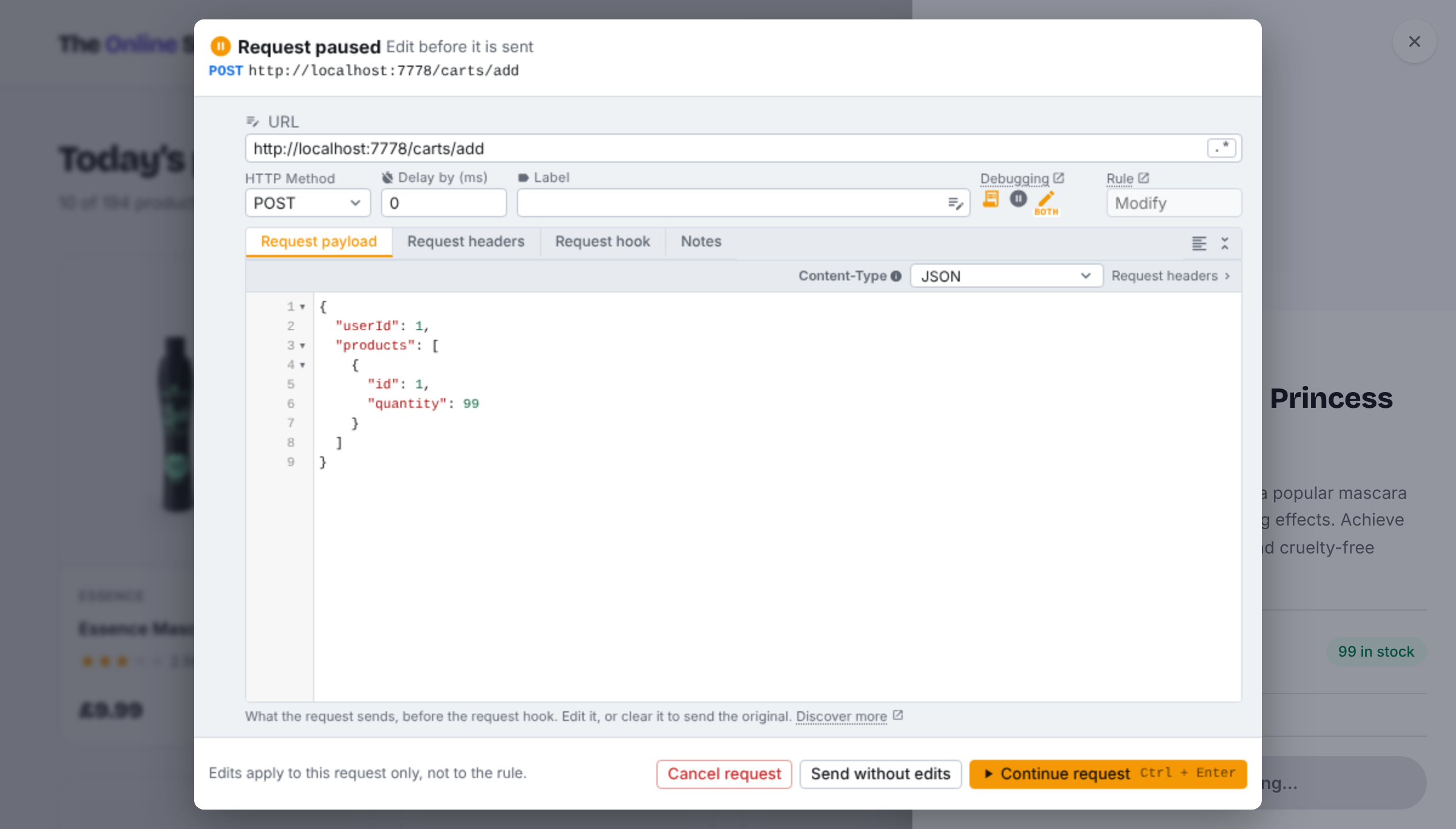
Use your app as normal. When it sends a matching request, tweak holds it and opens an editor on the page itself, showing only the side that is paused. On a modify rule you edit the live request: the URL, body and headers that are about to go out.
4. Continue, or send it untouched
- Continue request (Ctrl/⌘ + Enter): the request goes out with your edits.
- Send without edits: it goes out as the rule would have sent it.
- Cancel request: it never goes out. Your app sees it aborted (
fetchrejects with anAbortError), a quick way to test that path too.
If several matching requests fire at once, they wait in line and the editor shows how many are queued.
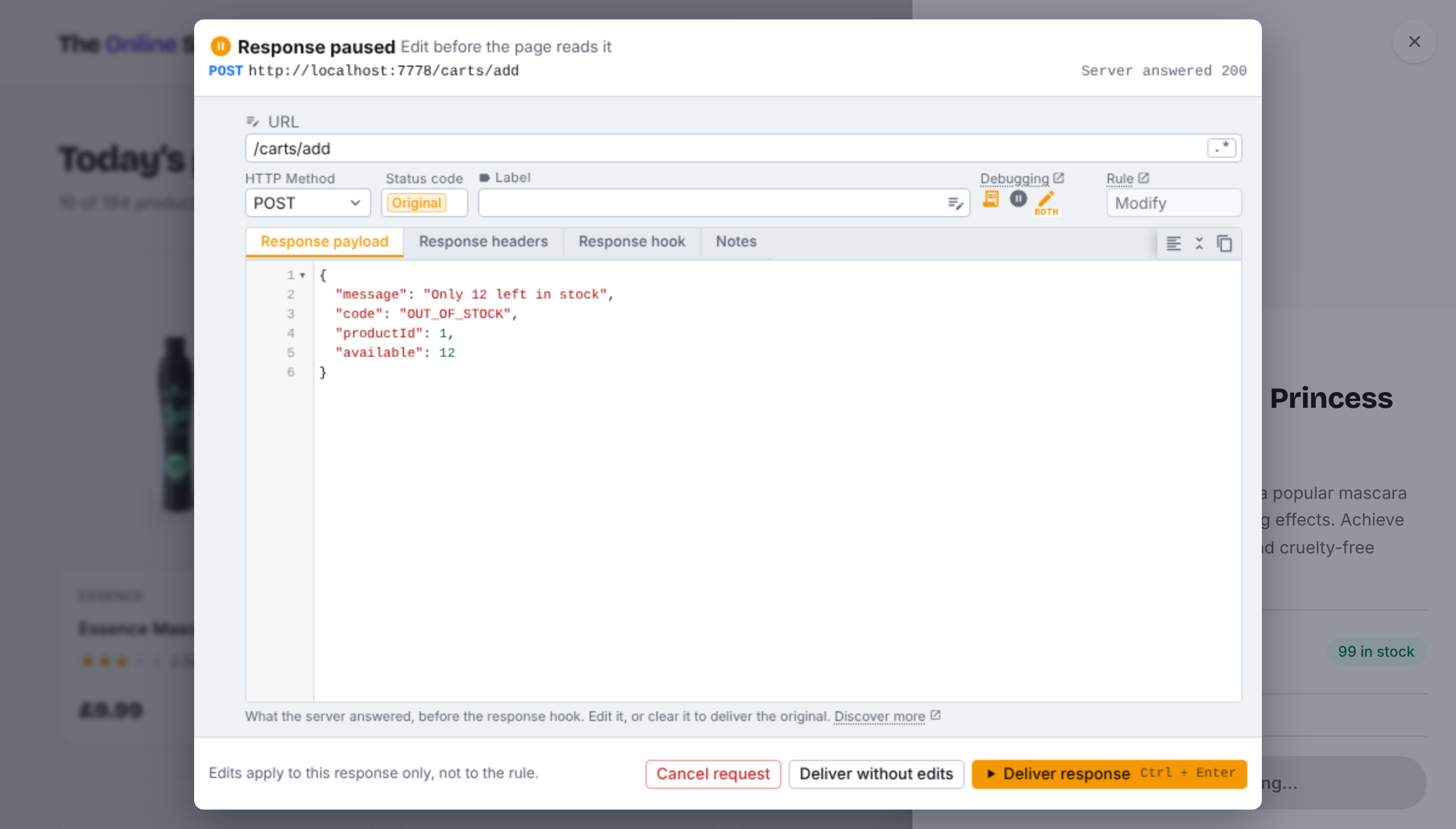
5. Optional: rewrite the response before your app reads it
With Pause the response (or both), the server's answer waits for you. Change the body, then Deliver response, Deliver without edits, or Cancel request.
6. Make it permanent, or switch it off
Edits apply to that one request only. If you find yourself making the same edit every time, put it in the rule itself (the request payload tab, a request hook or a JavaScript snippet for the response) and turn Edit before send off.
Full reference: Edit before send docs.
9 things you can do with a paused request
- Test server side validation. Your form blocks a quantity of 99, a negative price or an expired coupon. The API should too. Pause the request, type the value the UI would never send, and see if the backend rejects it.
- Check authorization on your own app. Swap the user, tenant or order id in the URL or body and confirm the server answers
403, not someone else's data. - Expire a session on demand. Edit the
Authorizationheader to a stale token and watch how your refresh and logout flow behaves, without waiting an hour. - Try an API change before the backend ships it. Add the new field to the body and see what the current server does with it.
- Reproduce a bug report. A customer sent a payload that broke something. Paste it into the paused request and hit the exact path again.
- Design error states with real traffic. Pause the response and turn a
200into the out of stock, rate limited or validation error your designer asked about. - Freeze a loading state. While a request is paused, your app is waiting on it. Skeletons, spinners and disabled buttons stay on screen as long as you need to inspect or screenshot them.
- Debug third party calls. See exactly what an analytics, payment or chat widget sends from your page, and change one field to see how it reacts.
- Stage a demo. Edit a response so the dashboard shows the numbers you want to present, then deliver it. Nothing on the server changes.
Use it on applications you own or are authorised to test.
Edit before send vs the alternatives
Feature comparison
| tweak | Charles | Fiddler Everywhere | Proxyman | Burp Suite Pro | HTTP Toolkit | |
|---|---|---|---|---|---|---|
| Pause and edit request | ✅ | ✅ | ✅ | ✅ | ✅ | ✅ |
| Pause and edit response | ✅ | ✅ | ✅ | ✅ | ✅ | ✅ |
| Runs as | browser extension | desktop proxy | desktop proxy | desktop proxy | desktop proxy | desktop proxy |
| Root certificate / proxy setup | none | required for HTTPS | required for HTTPS | required for HTTPS | required for HTTPS | automated, per client |
| Editor appears | over the page | in the app window | in the app window | in the app window | in the app window | in the app window |
| Mock and rewrite rules | ✅ | ✅ | ✅ | ✅ | match and replace | ✅ (Pro) |
| Mobile apps, desktop apps, cURL | ❌ | ✅ | ✅ | ✅ | ✅ | ✅ |
The pattern is clear: desktop proxies see everything on your machine, and pay for it with setup. tweak sees what your web app sends, and needs nothing but the extension. If your bug lives in a browser tab, the second is the shorter path.
Price comparison
List prices for the paid tier that includes breakpoints, as published in October 2026. Check each vendor's site before buying, prices move.
| Tool | Price for 1 developer | Model | tweak saves (year one) |
|---|---|---|---|
| tweak Premium | $36 / year or $4 / month | subscription, cancel any time | n/a |
| Burp Suite Professional | $499 / year | subscription, per user | $463 (93%) |
| Fiddler Everywhere Pro | ~$144 / year ($12 / month annual) | subscription, per user | $108 (75%) |
| Proxyman Standard | $89 | perpetual, 1 year of updates | $53 (60%) |
| Charles Proxy | $50 | perpetual license | $14 (28%) |
Two honest notes:
- Charles and Proxyman are one time purchases. Over several years without upgrades, Charles ends up cheaper than a tweak subscription. If you need system wide interception, that is a fair trade. If you only debug web apps, you are paying for a proxy you have to configure, and tweak's $4 month lets you pay for the one week you actually need it.
- Free tools exist. HTTP Toolkit's free tier includes request and response breakpoints, and Burp Suite Community, OWASP ZAP and mitmproxy intercept for free. They are proxies or separate apps, each with its own setup. Tamper Dev is a free extension that pauses requests, though its store reviews report it misses requests made by JavaScript. tweak's case is not "the only way", it is "the fastest way, in the browser you already use, alongside your mocks".
What about Requestly and ModHeader?
Both rewrite traffic automatically from rules: set a header, redirect a URL, replace a response. That covers the "every time" case. We did not find an interactive pause and edit in either at the time of writing. tweak does both: rules for every time, Edit before send for just this once. Coming from ModHeader? See Goodbye ModHeader, hello tweak. Comparing with Requestly in general? See tweak vs Requestly.
Choosing the right tool for the job
Start with your AI assistant
These days, ask your AI tools first. They are breaking down the barriers between tools and stitching different workflows together, so if one of them can do the job for you, start there.
Sometimes they can't. Some jobs are runtime configuration of your environment, and they repeat on every page load:
- attaching certain request headers to every request in a browsing session (headers only rules)
- continuously redirecting a set of outbound HTTP requests to a different host (redirect rules)
- pausing the next matching request so you can change it by hand (Edit before send)
An AI assistant is not a good fit for that kind of work. You don't want to ask for the same header on every request; you want a rule that keeps applying it, in the browser, until you switch it off. That is the gap a focused tool fills.
When a desktop proxy is the better choice
Pick Charles, Proxyman, Fiddler or Burp if:
- the traffic comes from a mobile app, a desktop app, a CLI or a backend service
- you need to pause page navigations, scripts, images or service worker requests (tweak pauses
fetchand XHR, see known limitations) - you are running a full security assessment with scanners, intruders and repeaters
When tweak is the better choice
Pick tweak if the request comes from a web page and you want to change it now, without leaving the tab.
Every tool in this article is a good tool, and experts with different specialities reach for different ones to get different jobs done. What I'm saying is that in some cases you are better off with tweak, and you will save a lot of money doing it. Weigh which one best fits the problem you have, not the one with the longest feature list.
FAQ
How do I edit an HTTP request before it is sent from the browser?
Use a tool that can pause the request in flight. Desktop proxies (Charles, Fiddler, Proxyman, Burp Suite) call this a breakpoint and need the browser routed through them with a trusted certificate. tweak does it inside the page: create a modify rule for the URL, switch on Edit before send, trigger the request, change the URL, body or headers in the editor that opens, and press Continue request.
Can Chrome DevTools pause a request and let me change it?
No. DevTools can pause your JavaScript when a fetch or XHR fires (XHR/fetch breakpoints), and Local Overrides can replace a response, but there is no built in way to edit the outgoing request itself and send the edited version. "Edit and Resend" style features replay a request that already went out.
Can I edit the response before the page reads it?
Yes. Set Edit before send to "Pause the response" or "Pause the request and response". The server answers, tweak holds the answer, and you can rewrite it (an error, an empty list, an out of stock item) before your app sees it.
Do my edits change the rule?
No. Edits apply to the one request that is paused. The rule keeps doing what it was saved to do for every request after it.
Do I need a proxy or to install a certificate?
Not with tweak. It runs as a browser extension inside the page, so there is no proxy to configure, no root certificate to trust and no system wide traffic rerouting.
Which requests can tweak pause?
Requests your page makes with fetch or XMLHttpRequest, which covers REST and GraphQL API calls. It does not pause page navigations, images, scripts, service worker requests or traffic from apps outside the browser. For those, a desktop proxy is the right tool.
How much does Edit before send cost?
Edit before send is part of tweak Premium: $4 a month or $36 a year, with a 7 day free trial. Commercial proxies with breakpoints are listed at $50 (Charles, one time), $89 (Proxyman Standard), about $144 a year (Fiddler Everywhere Pro, billed annually) and $499 a year (Burp Suite Professional).
Is there a free way to pause and edit requests?
Yes. HTTP Toolkit (free tier), Burp Suite Community, OWASP ZAP and mitmproxy all have free request interception, and Tamper Dev is a free extension. They are proxies or standalone tools with their own setup. tweak is the option for developers who want pausing, mocking and rewriting in one rule, inside the browser they already use.
Try it
Start the 7 day free trial, add a modify rule for the request you are debugging, set Edit before send to Pause the request, and trigger it. The next request is yours to change.
New to tweak? Start with the introduction. The free plan gives you 12 mock rules, no account required.
Need something else? Request a feature